
Quick picks
Linking your RAV4 to the app
So you'll start by downloading the Toyota app for iPhone or Android and signing in. The setup itself only took me a few minutes.
- First, you'll want to park somewhere your phone has good cell service and turn on Bluetooth. Then you'd sit in the driver's seat with the car running. The app reminds you to do this somewhere with good ventilation.
- Next, you'll want to follow the steps on the car's screen until a QR code or an 8-digit code shows up. Then you just scan it or type it into the app.
- Then the app shows your model and year, and asks you to pick a preferred dealer.
- Finally, you get the Activate or Deactivate screen. And this one's a bit more involved, so I'll go over it in the next section.
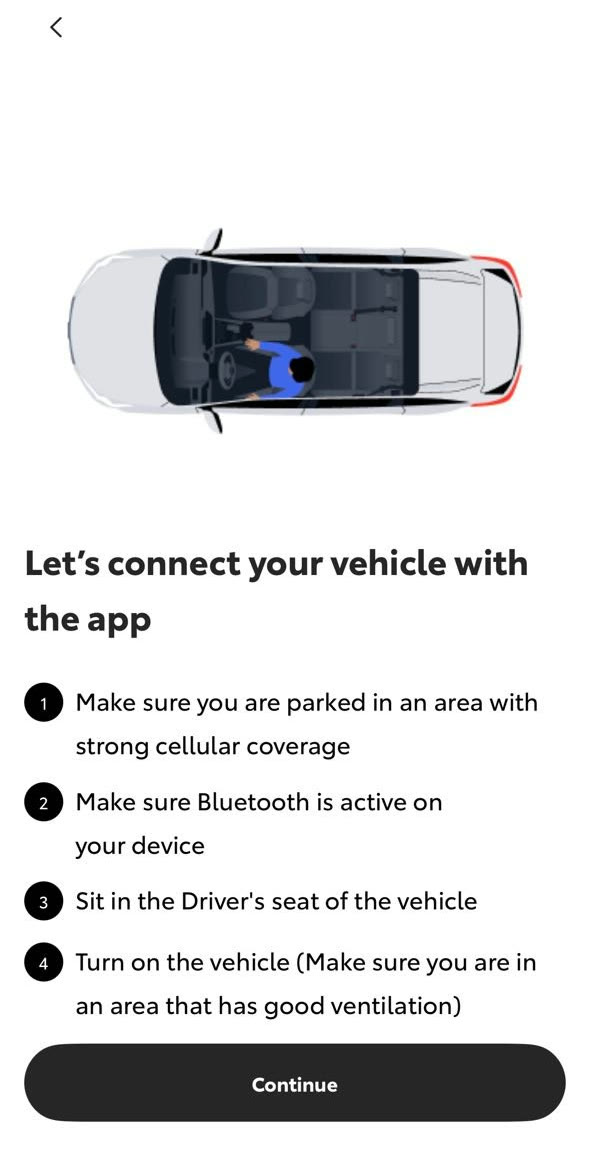
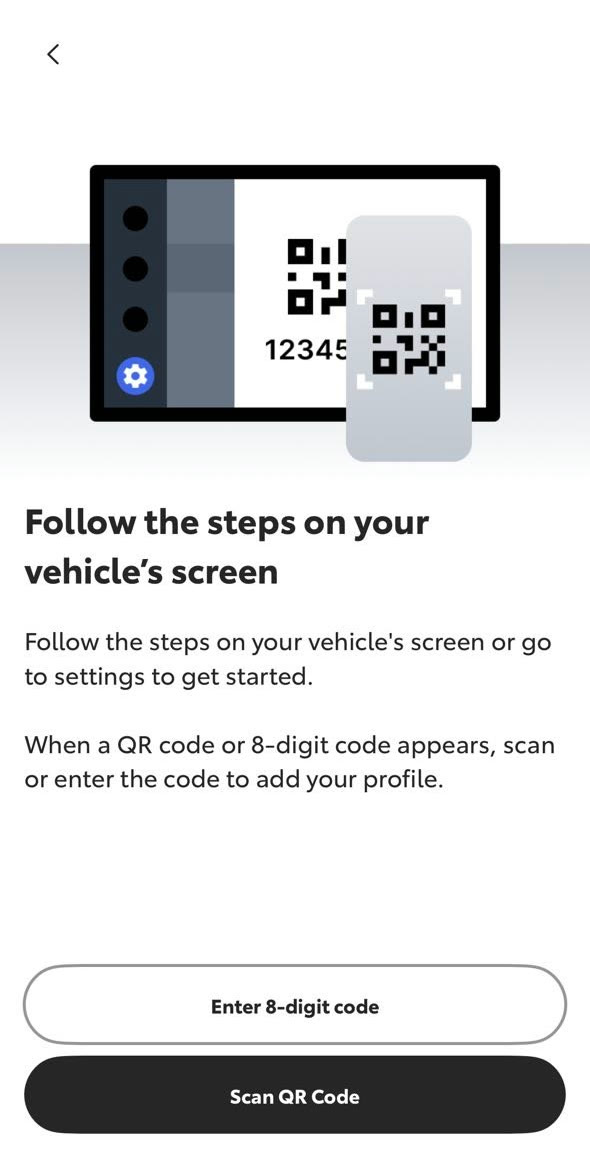
The first two screens when I linked my RAV4. You can tap any picture to make it bigger.
The Activate or Deactivate screen
So before any of the services turn on, the app asks you to make a choice. And it's worth reading carefully, because each option means something different for your data.
- Activate Vehicle turns on all the trials. Basically, you're agreeing that Toyota can use your car's location, driving and vehicle health data, including your precise location. They use it to run the services, and also "for internal research and data analysis." The app also says your precise location gets shared with Google for navigation.
- Deactivate Vehicle turns off the data. Toyota says it won't receive your location, driving or vehicle health data. But keep in mind that none of the Connected Services will work, and that includes the free crash call and SOS button. So Deactivate really makes sense if keeping your data private matters more to you than those safety features.
- Cancelling without picking either one is the option that surprised me. You don't get any of the services, but Toyota says it still uses your car's less precise location, driving and health data for its own research. So skipping the screen doesn't actually stop Toyota from using your data. Only Deactivate does that.
And something to note is that you can change your choice later in the Privacy Portal inside the app. Toyota's full rules are in its Connected Services privacy notice if you want to read through them.
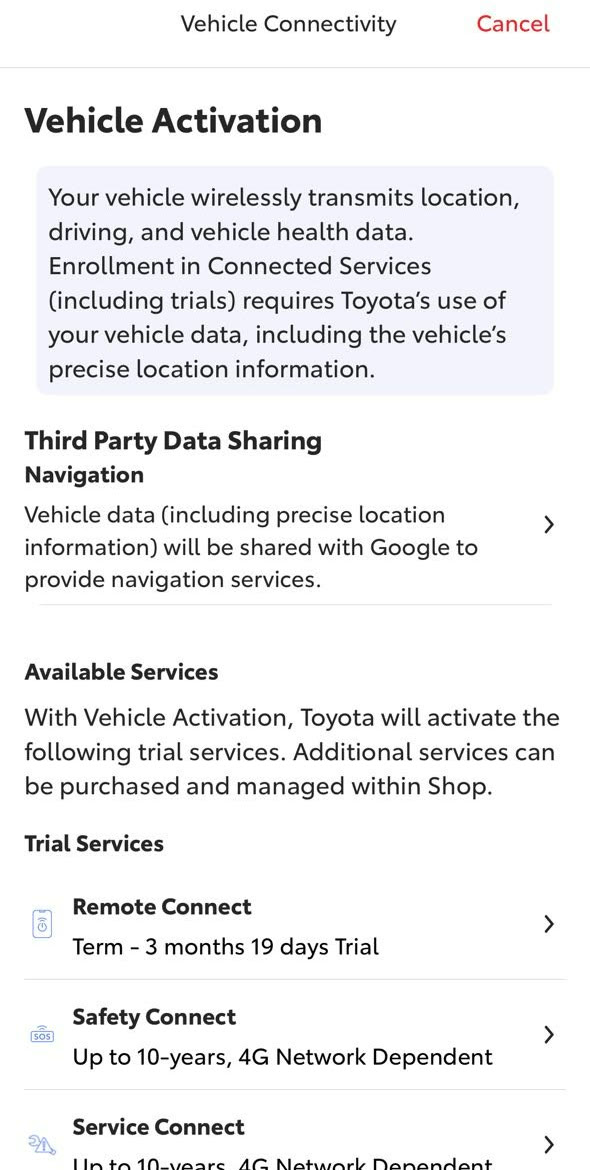
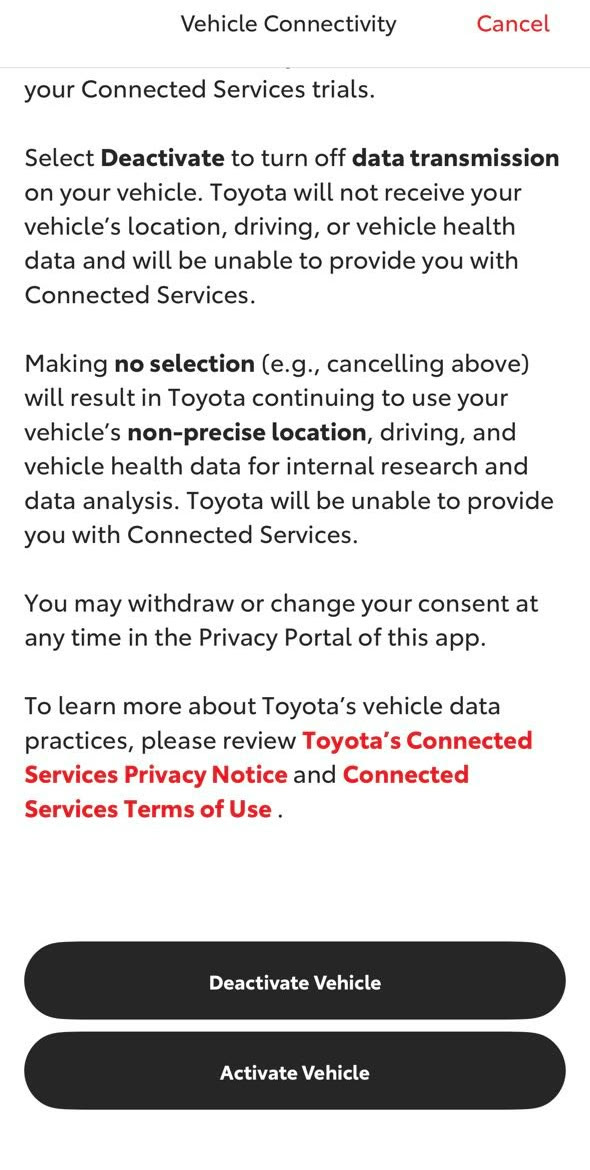
The Vehicle Activation screen on my RAV4, top and bottom.
What each service does, and what it costs after the trial
So these are the trials Toyota's 2025 feature chart lists for the 2025 RAV4. And something important to note is that every trial starts on the day the car was first sold. Basically, the clock is already running before you ever open the app. The only exception is Wi-Fi Connect, which starts when you turn it on. That's why my app only showed 3 months and 19 days left on Remote Connect, even though I'd just set it up.
| Service | What it does | Free trial on a 2025 RAV4 | After the trial |
|---|---|---|---|
| Safety Connect | SOS button, automatic call to a response center after an airbag deploys or a bad rear-end crash, roadside assistance, and help finding the car if it's stolen | Up to 10 years, every trim | Toyota's chart doesn't list a RAV4 price |
| Service Connect | Maintenance reminders, recall notices and warning light alerts in the app, and optionally to your dealer | Up to 10 years, every trim | No paid version listed |
| Remote Connect | Start the car, set the climate, lock and unlock, find where you parked, and get alerts about guest drivers, from your phone or watch | 1 year on XLE and up. Not included on the LE, and the LE can't remote start the engine even with a plan | Included in every plan, from $15 a month |
| Drive Connect | Toyota's cloud navigation, a voice assistant, and live agents who send directions to the car | 1 year on the Hybrid XSE and on cars with the 10.5-inch screen. Lower trims have no trial | Go Anywhere plan, $15 a month, or Premium, $25 |
| Wi-Fi Connect | Turns the car into a hotspot for up to 5 devices on AT&T, and is needed for streaming music through the car | 30 days or 3 GB, whichever comes first | $25 a month through AT&T |
| SiriusXM | Satellite radio | 3 months | SiriusXM's own rates |
| Apple CarPlay and Android Auto | Puts your phone's maps, music, podcasts and messages on the car's screen, without a cable | Standard, no trial needed | Free |
Now there's one line in the fine print I found a bit confusing. It says the 10-year Safety Connect trial is "included for up to 10 years on select vehicles with paid Connected Services packages." But my app lists Safety Connect as a 10-year trial without any paid plan. So that's what I'm going by here. If your app shows something shorter, I'd recommend asking your dealer.
And also keep in mind that every one of these services runs over the car's 4G connection. Toyota's fine print says that if the 4G network ever gets shut down, the services stop working. But that really only matters if you plan to hold on to the car for a long time.
The paid plans
So these are the prices on Toyota's Connected Services plans page, which I checked on October 13, 2026. Every plan includes Remote Connect. So basically, if you want remote start after the trial, you'd need one of these plans.
| Plan | Price | What it adds | Free alternative |
|---|---|---|---|
| Music Lover | $15 a month | Plays your Apple Music or Amazon Music account through the car's own connection, plus Remote Connect | CarPlay or Android Auto plays the same music from your phone |
| Go Anywhere | $15 a month | Drive Connect navigation, voice assistant and live agents, plus Remote Connect | Google Maps, Apple Maps or Waze through CarPlay or Android Auto |
| Premium | $25 a month | Everything in both plans above | Your phone, as above |
| Wi-Fi Connect (add-on) | $25 a month through AT&T | A hotspot for up to 5 devices | Your phone's hotspot, if your phone plan includes one |
- Keep in mind you'd still pay for the music service too. Music Lover and Premium use your own Apple Music or Amazon Music subscription. And Toyota's 2025 chart says Integrated Streaming, which is basically the feature that plays your music through the car's own connection, also needs an active Wi-Fi Connect subscription. The plans page doesn't mention that, so I'd recommend asking your dealer about it before buying Music Lover.
- If you're already with AT&T, Toyota says you can add the car to your existing phone plan. You can see the details on AT&T's in-car Wi-Fi page.
- Now older RAV4s can be a bit different. Toyota's chart does list an $8 a month Remote Connect renewal, but only for some other models like the GR86, not the 2025 RAV4. So if you have a 2019 to 2022 RAV4, it's worth checking what your own app offers.
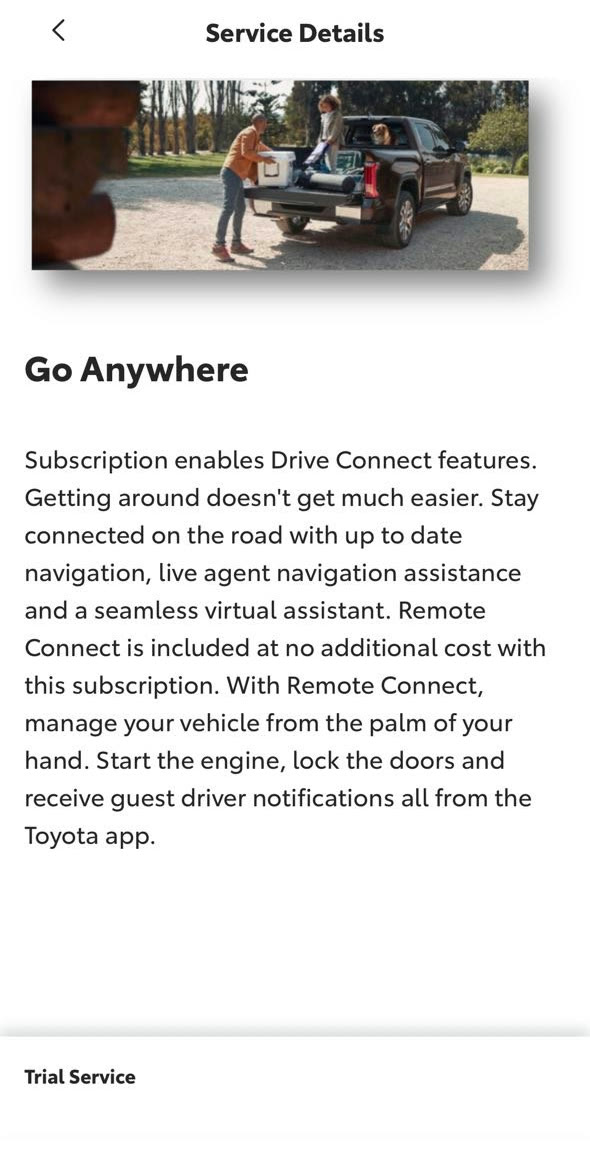
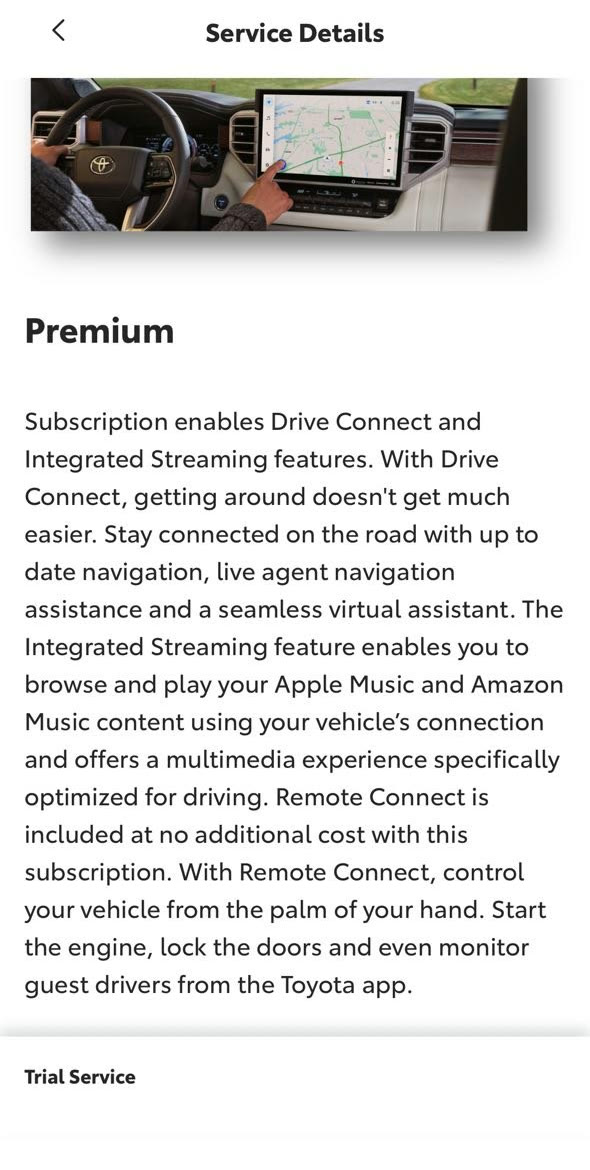
The Go Anywhere and Premium plan screens in my app. You'll notice neither one actually shows a price.
Is Remote Connect worth $15 a month?
So Remote Connect is really the one paid feature that's worth thinking about. Being able to warm up the car from your phone on a cold morning, or cool it down in the summer, is honestly pretty useful. But Toyota only sells it inside a plan, so after the free year it's at least $15 a month, or about $180 a year.
- Before you pay, it's worth trying the key fob. On a lot of Toyotas, you can remote start by pressing lock, then lock again, then holding lock for about three seconds. Your owner's manual will have the exact steps for your car. And in 2021, Toyota told Motor1 that key fob remote start works during any active trial, including Safety Connect and Service Connect, which run up to 10 years. But keep in mind I haven't confirmed this on a 2025 RAV4 yet. So I'll try it on mine when my Remote Connect trial runs out, and update this page.
- If you live somewhere really cold or hot, and you'd start the car from the house most days, then $15 a month could be worth it for you.
- But otherwise, if you mostly played with it in the first few weeks, then I'd skip the plan and put that $180 a year toward something else.
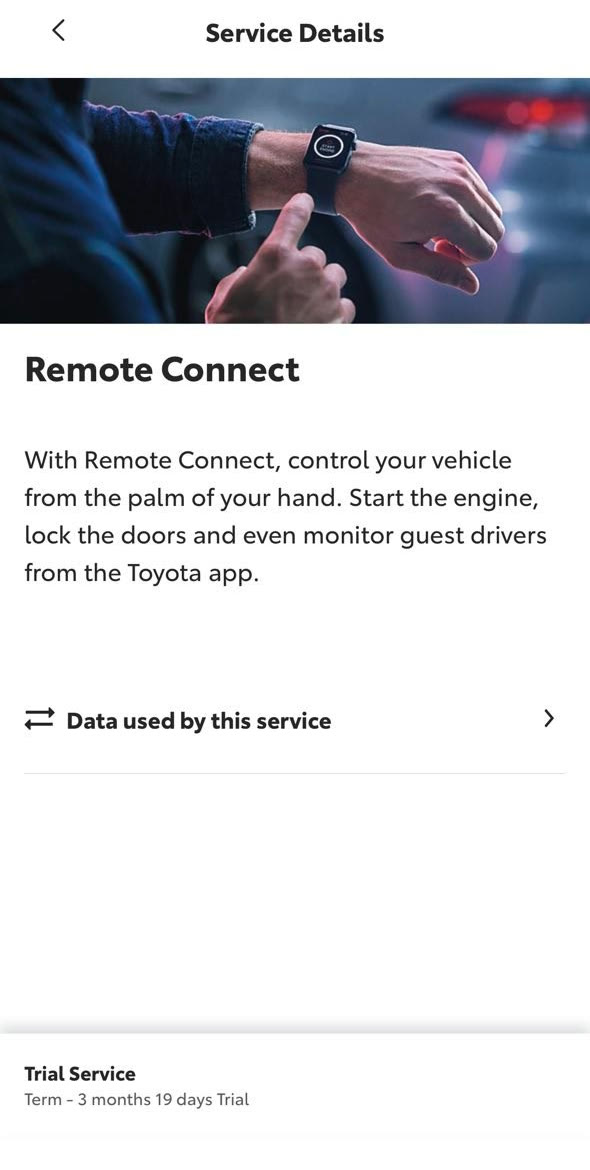
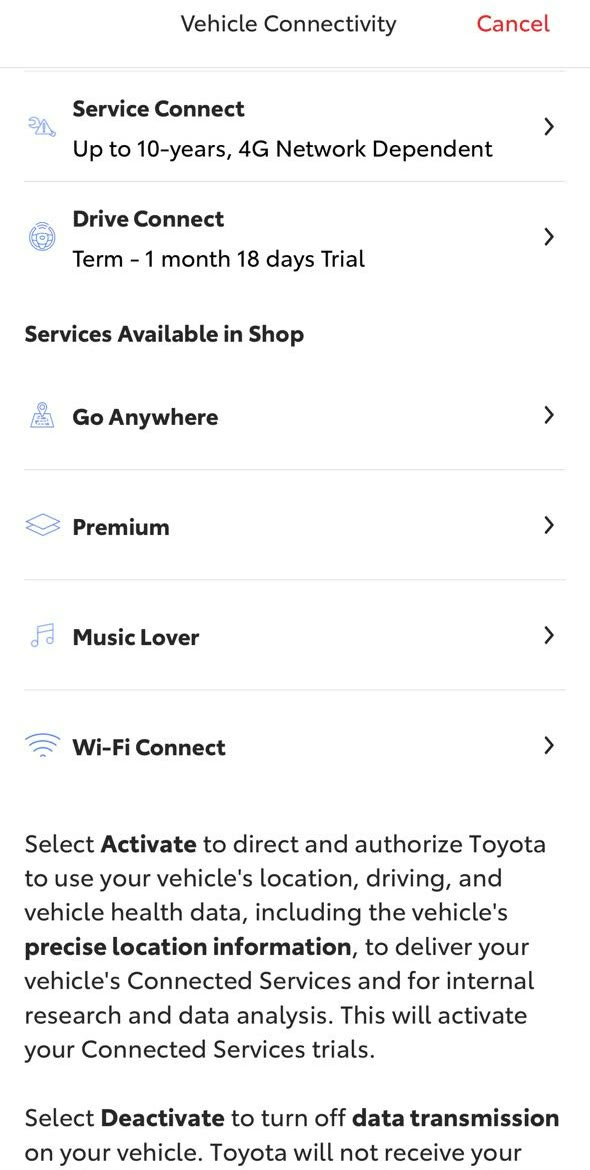
Remote Connect with the trial time I had left, and the plans the app's Shop offered me.
What you get without paying anything
So just to recap real quick, here's everything you keep for free.
- Safety Connect gives you the SOS button, the automatic crash call, roadside help and stolen car tracking, for up to 10 years.
- Service Connect sends maintenance reminders and recall alerts to the app, also for up to 10 years.
- And the Toyota app itself is free to download, and it works with both of those services.
- Wireless Apple CarPlay and Android Auto put your phone's maps and music on the car's screen, and they come standard on the 2025 RAV4.
Buddy's take
So ultimately, I'd recommend tapping Activate so you keep the free crash call and SOS button. And then I'd check the Privacy Portal for any data sharing you don't want.
And I'd use CarPlay or Android Auto for maps and music, because they're free and already come standard, instead of paying for Drive Connect or Music Lover.
Then I'd decide on Remote Connect near the end of your free trial. If you've been warming up the car from your phone every winter morning, $15 a month might be worth it for you. But otherwise, I'd try the key fob first, and just let Remote Connect lapse.
So hopefully this helped you sort out which Toyota app services are actually worth keeping for you. And if you have any questions, feel free to email me at contact@ravbuddy.com, as I read every message.
More owner guides
- Screenshots from setting up my own 2025 RAV4 Hybrid in the Toyota app on October 13, 2026. I left out the screen that shows my full VIN.
- Trial lengths from Toyota's 2025 Audio Multimedia and Connected Services feature chart. Plan prices from Toyota's Connected Services plans page, checked October 13, 2026. Toyota says prices can change without notice.
- Toyota's support page on Remote Connect trials and privacy notice.
- Key fob remote start statement from Motor1. Lawsuit reported by Insurance Journal.
RAV Buddy is an independent fan site. We're not affiliated with or endorsed by Toyota. RAV4 is a trademark of Toyota Motor Corporation.