
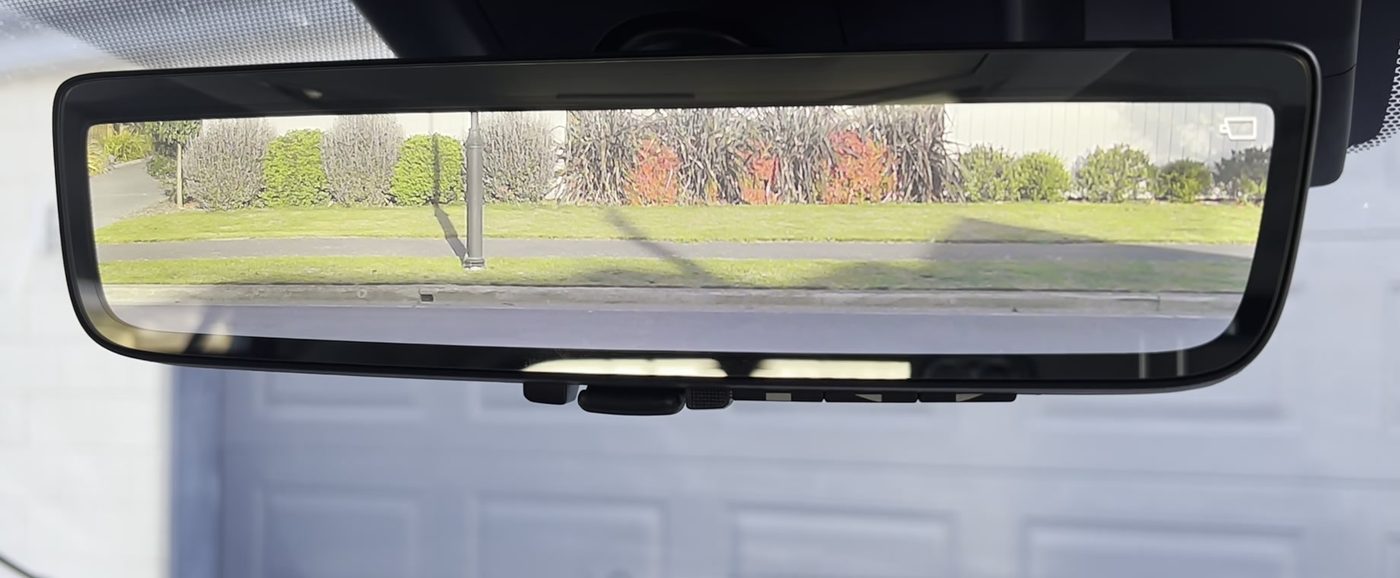
Here's the digital rearview mirror in a 2023 to 2025 RAV4 with the camera picture on, so you see a clear, wide view out the back with no headrests in the way. The small camera icon in the top right corner of the screen means the mirror's camera is working, and the lever and buttons sit along the bottom edge of the mirror. From ToyotaFuzz's video, filmed in a right-hand drive RAV4.
Quick picks
What the RAV4 digital rearview mirror is
So the digital rearview mirror looks like a regular inside mirror, but the mirror glass is also a screen. Basically, when the screen is on, the mirror shows live video from a separate camera at the back of the RAV4. And when the screen is off, the mirror works like any ordinary mirror.
Toyota calls these two choices "modes." Digital mirror mode is the screen on, showing the camera picture. Optical mirror mode is the screen off, working as a plain mirror. The 2026 manual just calls the plain mirror "mirror mode."
Now the reason the camera picture is useful is that the mirror's camera doesn't see the headrests, your passengers' heads or a cargo area that's packed to the roof. The camera picture also shows a wider view than the glass mirror, so owners say they can see more of the lanes beside them.
Something important to note is that the digital rearview mirror does not use the backup camera. The backup camera sits down by the license plate and only shows on the center screen when you're in Reverse. The digital rearview mirror has its own camera, high up at the back of the car.
- On a 2019 to 2025 RAV4, the mirror's camera sits inside the car, at the top center of the back window, looking out through the glass.
- On a 2026 RAV4, Toyota moved the mirror's camera outside. It's now a small waterproof camera at the top center of the liftgate, just above the back window.
And when the camera picture is on, a small icon shows in the top right corner of the screen. A lot of people think that icon is a phone battery symbol. But the icon just means the mirror's camera is working.
On 2022 to 2025 RAV4s, Toyota's manual says the digital rearview mirror has a small built-in cooling fan, so you may hear a faint fan sound. And the mirror can feel warm when the camera picture is on. Toyota says that's normal.
What each lever and button on the digital rearview mirror does
So the bottom edge of the digital rearview mirror is where most of the confusion comes from, because the bottom edge has seven controls that do very different things. Here's what each one does, from the center of the mirror outward.
| Control | Where it is | What it does |
|---|---|---|
| Lever | Center of the bottom edge | Switches between the camera picture and the plain mirror. On a regular mirror, this same lever dims the mirror for night driving. On the digital rearview mirror, the lever turns the screen on and off instead. |
| Menu button | Bottom edge, just right of the lever | Shows the row of setting icons, and each press moves to the next icon. Holding the menu button for about 10 seconds forces the mirror back to a plain mirror if the lever ever stops working. |
| Two adjust buttons | Bottom edge, right of the menu button | Change whichever setting the menu button picked. The left adjust button makes the setting less, and the right adjust button makes the setting more. |
| Three HomeLink buttons | Bottom edge, left side (on 2022 to 2026 mirrors) | Open your garage door, gate or other device once you program the HomeLink buttons. The HomeLink buttons have nothing to do with the camera. |
And there are two dimming settings inside the menu that sound alike but do different things. Here's what each dimming setting dims.
- Auto anti-glare dims the plain mirror. Basically, auto anti-glare darkens the glass mirror at night so headlights behind you don't blind you. Every RAV4 with the digital rearview mirror has auto anti-glare.
- Digital anti-glare dims the camera picture. Digital anti-glare darkens bright headlights in the camera picture at night. Digital anti-glare is only on the 2026 RAV4. No 2019 to 2025 RAV4 manual lists digital anti-glare.
How to tell which digital rearview mirror you have
So the steps for the camera picture are the same whether your RAV4 has the 7-inch or the 12.3-inch gauge screen behind the steering wheel. That's because the digital rearview mirror has its own buttons and never uses the gauge screen or the center screen. The only things that change by year are the menu icons, the camera location and the HomeLink setup. So here's how to tell which mirror you have.
- A 2019 to 2021 RAV4 (not the Prime) has six icons on the digital rearview mirror's menu and no house icon. So HomeLink is set up the old way, without a guide on the screen.
- A 2022 to 2025 RAV4, and the 2021 RAV4 Prime according to owners, has a house icon and a globe icon at the end of the menu. The house icon opens a step-by-step HomeLink guide on the mirror screen.
- A 2026 RAV4 has the digital anti-glare setting on the menu, and the mirror's camera is outside on the liftgate instead of behind the back window.
The easiest check is to flip the lever so the camera picture is on, press the menu button and look at the icons. If you see a house icon, your mirror has the HomeLink guide.
And owners noticed that the 2020 digital rearview mirror is a bit bigger and has no frame, while the 2019 mirror is smaller with a frame. That size difference comes from owners comparing their cars and brochures, not from Toyota.
How to set up the digital rearview mirror before you drive
Toyota says to set up the digital rearview mirror in this order, and to do it while you're parked. Toyota warns not to adjust the mirror or its settings while driving.
- Park the RAV4 somewhere safe, with the car on.
- Flip the lever on the bottom of the mirror so the screen is off. Now the digital rearview mirror is a plain mirror.
- Aim the plain mirror by hand so you can see out the back window, the same way you'd aim any rearview mirror. The digital rearview mirror can also slide up or down on its mount, so you can move the whole mirror up or down to suit how tall you sit.
- Flip the lever back so the screen is on. You'll see the camera picture, with the small camera icon in the top right corner.
- Adjust the camera picture with the menu, using the steps in the next section.
- Get used to the difference before you drive. The camera picture is wider than the plain mirror, and cars behind you can look a different size and distance than they do in a normal mirror.
How to change the camera picture on the digital rearview mirror
- Flip the lever so the camera picture is on, with the car on.
- Press the menu button once. The menu button is just right of the lever. A row of small icons appears along the bottom of the screen.
- Press the menu button again as many times as you need to highlight the setting you want to change.
- Press the left or right adjust button to change the highlighted setting. A small slider on the screen shows the level.
- Stop pressing buttons. The icons go away on their own after about 5 seconds, and the mirror keeps the change.
Here's what every icon on the digital rearview mirror's menu does, from left to right.
| Icon | Setting | What the setting changes |
|---|---|---|
| Sun | Brightness | How bright the screen is. Toyota warns that a screen set too bright causes eye strain. The screen also adjusts its own brightness to how light it is outside. |
| Up and down arrow | Up and down | Moves the picture up or down, so you see more road or more sky. The camera itself doesn't move. The mirror just shows a different part of the camera picture. |
| Left and right arrow | Left and right | Slides the picture left or right. |
| Curved arrow | Tilt (Toyota calls it "angle") | Turns the picture a step clockwise or counterclockwise with each press, so the horizon looks level. A lot of owners don't realize the tilt is done on the screen, since the camera is fixed in place. |
| Magnifying glass | Zoom | Zooming in makes things bigger but shows less. Zooming out makes things smaller but shows a wider view. |
| Mirror with a sun | Auto anti-glare | Turns the night dimming of the plain mirror on or off. You can change auto anti-glare with the camera picture on or off. |
| 2026 only | Digital anti-glare | Turns the night dimming of the camera picture on or off. When digital anti-glare is on, an indicator shows in the top left corner of the screen. |
| House | HomeLink Set Up (2022 and newer) | Opens the HomeLink Training Tutorial, which is Toyota's step-by-step guide on the mirror screen for programming the garage door buttons. |
| Globe | Language (2022 and newer) | Changes the language of the HomeLink Training Tutorial. |
And keep in mind that if you push the up, down, left, right or tilt settings a long way, the camera picture can look a little stretched or bent. Toyota says that's normal. On the 2019 to 2021 RAV4 (not the Prime), the menu stops after auto anti-glare, so there's no house or globe icon.
How to turn auto anti-glare on or off with the plain mirror
- Flip the lever so the screen is off and the digital rearview mirror is a plain mirror.
- Press the menu button. The icons show on the mirror.
- Press the menu button again until the auto anti-glare icon is highlighted. A small setting screen appears.
- Press the left or right adjust button to choose ON or OFF.
- Stop pressing buttons, and the icons go away after about 5 seconds.
How to turn the camera picture off and back on
So to turn the camera picture off, you just flip the lever on the bottom of the digital rearview mirror. And to turn the camera picture back on, you flip the lever back. There's nothing else to reset.
Now if the lever ever stops working, press and hold the menu button for about 10 seconds. That forces the digital rearview mirror back to a plain mirror. Then I'd have a Toyota dealer check the mirror.
What happens after you turn the RAV4 off
- The camera picture only works with the car on. When you turn the car off, or switch the car to accessory mode, the camera picture goes away a few seconds later. Basically, accessory mode is when only the radio and other accessories have power.
- Auto anti-glare always turns itself back on every time you start the car, even if you turned auto anti-glare off on your last drive.
- The lever is a physical switch, so the lever should stay in whichever position you left it. But Toyota's manual doesn't actually say whether the mirror starts in camera mode or plain mirror mode next time.
- The picture settings, like brightness, zoom and tilt, aren't covered in Toyota's manual either. So I can't confirm whether the picture settings are saved after you turn the car off. But I haven't seen owners complain about the picture settings resetting.
And these are the warning symbols the digital rearview mirror can show, and what to do about each one.
- A symbol shows for a few seconds with the camera picture on. That can mean a problem with the mirror's camera system. Flip the lever to the plain mirror and have a Toyota dealer check the mirror.
- The screen dims and a symbol shows. That means the digital rearview mirror is too hot. The screen keeps getting dimmer and then turns off. So cool down the inside of the car, and the symbol goes away once the mirror cools. If the symbol stays, see a Toyota dealer.
- On a 2026 RAV4, the screen dims and a symbol shows near a phone. The 2026 manual says a phone or other wireless device close to the mirror can cause the dimming. So move the phone or device away from the mirror.
How to clean the digital rearview mirror's camera
2019 to 2025 RAV4, including the Prime
So on a 2019 to 2025 RAV4, the mirror's camera looks out through the top center of the back window. And the camera lens sits right in the path of the rear wiper, so the rear wiper keeps the camera's view clear. Here's what Toyota says to clean for each problem.
- The outside of the back window is dirty or wet. Run the rear wiper.
- The inside of the back window is dirty. Wipe the glass with a soft, damp cloth.
- The camera lens itself is dirty. Wipe the lens gently with a soft, damp cloth or a cotton swab. Don't rub hard, because that can scratch the lens. And don't use window cleaner, wax, glass coating or any solvent on the lens.
- The back window is fogged up. Turn on the rear defogger, then flip back to the camera picture once the glass clears.
- The mirror screen is dirty. Use a soft, dry cloth only. Toyota says no thinner, benzene or alcohol on the screen.
And keep in mind that bags piled up near the back window can reflect in the glass and spoil the camera picture. So move the bags, or cover them with a black cloth. The liftgate also has to be fully closed, or the camera picture may not look right.
2026 RAV4
On a 2026 RAV4, the mirror's camera is outside, in a small waterproof housing at the top center of the liftgate. So you'd wipe the camera lens with a soft, damp cloth, or a cotton swab if a cloth is hard to fit. And just like on the older RAV4, don't rub the lens hard.
One 2026 Limited owner said cleaning the outside camera lens made his hazy night picture better. Now something to note is that the 2026 manual's problem table says to see a Toyota dealer for water drops or dust on the lens. And that same 2026 table says to see a dealer for a dirty inside of the back window, which doesn't really make sense with an outside camera. Those lines look carried over from the older design, and I can't confirm what Toyota means. So I'd just wipe the lens first, and only go to the dealer if the camera picture doesn't clear.
Tips for bifocal and progressive lens wearers
So trouble focusing on the camera picture is the biggest complaint owners have about the digital rearview mirror. Most of those complaints come from people who wear bifocals or progressive lenses. But plenty of glasses wearers also say the camera picture works fine once they set the mirror up, so it's worth trying the fixes below first.
Basically, a normal mirror shows things that are far away, so your eyes stay focused far away. But the camera picture is a screen about 2 feet from your face, so your eyes have to refocus up close. And with bifocals or progressives, the up-close part of the lens is at the bottom. But the mirror is up high, so you end up tipping your head back to see it clearly. Toyota's own manual says some people, depending on their age, take longer to focus on the screen and should use the plain mirror.
Here's what owners say helped them.
- Aim the screen straight at your eyes. Instead of aiming the digital rearview mirror out the back window, point the mirror at your face, like you're looking at yourself. Several owners with glasses said the camera picture got much easier to read once they aimed the mirror this way. And aiming the screen at your face also hides the reflection I mentioned earlier.
- Turn the brightness down, especially at night. Toyota warns that a screen set too bright causes eye strain.
- Zoom in a little. Something worth knowing is that the digital rearview mirror has no focus setting, even though some owners talk about focusing the camera picture. What helps is zoom, because zooming in makes cars behind you bigger and easier to read. The tradeoff is a narrower view.
- Give your eyes some time. Owners with bifocals said it took anywhere from a day or two to a few weeks to get used to the camera picture. One owner said it took four months, and now he can't do without the camera picture.
- Use the camera picture only when you need it. A lot of glasses wearers keep the digital rearview mirror as a plain mirror. Then they flip to the camera picture only when the cargo area is packed or there are tall passengers in the back seat.
So ultimately, the digital rearview mirror isn't for everyone, and that's okay. Because the lever lets you flip between the two, you still get the plain mirror any time the camera picture bothers your eyes.
Night, rain and glare problems, and how to fix them
So Toyota lists a few night and weather problems that don't mean the digital rearview mirror is broken. At night, colors can look off, headlights behind you can make the picture look white and blurry, and the screen can flicker as the brightness adjusts. And rain, fog, heat and cold can all make the camera picture hard to see. So can sodium lights (the orange kind of streetlight), fluorescent lights, nearby radio towers and exhaust drifting past the camera. Toyota's fix for almost all of these night and weather problems is to flip to the plain mirror until conditions improve. But owners have found a few more fixes.
The camera picture is hazy or cloudy at night
A hazy camera picture is the most common night complaint, and it shows up on every year from 2019 to 2026. Owners describe headlights looking hazy, with a star or halo around them, while the picture looks fine in daytime. Here's what owners say helps.
- Clean the camera's view. On a 2019 to 2025 RAV4, that means the back window inside and out, plus the camera lens. On a 2026 RAV4, that means the outside camera lens.
- Adjust the tilt setting. One owner with two RAV4s said changing the tilt reduced the star effect around headlights and made night driving better.
- Turn the brightness down at night.
- On a 2026 RAV4, turn on digital anti-glare, which dims bright headlights in the camera picture.
The camera picture is blurry in rain
On a 2019 to 2025 RAV4, run the rear wiper, because the rear wiper clears the glass the camera looks through. If the back window is fogged, turn on the rear defogger. And on dark, rainy roads, a few owners just flip back to the plain mirror until the rain stops.
Sun glare on the screen
Sunlight coming through the moonroof can wash out the digital rearview mirror's screen. Toyota's fix is to close the moonroof shade.
Things the camera picture doesn't show
- The back seat. The camera picture doesn't show your kids or pets in the back seat. Toyota says the rear seats are left out for privacy, so you'd flip to the plain mirror to check on them.
- Low things right behind the bumper. One owner showed that a trash bin right behind the bumper doesn't show in the camera picture. So use the backup camera when you're backing up, and Toyota says to look around directly too.
And Toyota warns passengers not to stare at the screen while the car is moving, because watching the screen can make some people carsick.
If the digital rearview mirror stops working
One 2021 XSE owner's digital rearview mirror quit in January 2024. The dealer first replaced the rear camera, which didn't help, and then replaced the mirror under warranty. The dealer quoted about $2,400 for the mirror without the warranty. So if your mirror acts up, it's worth getting the mirror looked at while the car is still under warranty.
Window tint and the digital rearview mirror
So on a 2019 to 2025 RAV4, window tint on the back window matters, because the mirror's camera looks out through that glass. Toyota says not to put any film, even clear film, on the part of the back window in front of the camera. But Toyota doesn't say how dark tint can be on the rest of the glass, so owners have filled in that gap.
- Dark film can ruin the night picture. One owner put 20% film over the factory privacy glass. The camera picture was fine in daytime, but at night it turned into a pixelated mess. His tint shop said not to go darker than 50% on the back window if you want to use the camera picture.
- Near-clear film seems fine. Another owner put LLumar AIR 80, a near-clear ceramic film, on all his windows, including the back window, with no effect on the camera picture. That link goes to LLumar's website, since AIR 80 is sold through tint installers rather than a store page.
- Ask for a cutout. Owners suggest asking the tint shop to leave a small gap with no film where the camera sits at the top of the back window. That's basically what Toyota's manual asks for.
Now one owner said his camera picture still looks clear with very dark rear tint, which doesn't match the 20% owner. I can't confirm why, but it may come down to how dark the film is and whether the shop cut around the camera. And on a 2026 RAV4, the mirror's camera is outside the glass, so rear window tint shouldn't affect the camera picture. I haven't seen a 2026 owner confirm that yet, though.
How to program the HomeLink garage door buttons
So HomeLink is a garage door opener built into the digital rearview mirror. Basically, you teach each of the three HomeLink buttons the signal from your garage remote, and then you can leave the remote at home. Each HomeLink button can open a different garage door, gate or other device.
When you press a HomeLink button, a small light shows above that button on the screen, along with the HomeLink logo. And the garage door codes HomeLink learns stay saved even if the car's 12-volt battery is disconnected. HomeLink also has its own help site at homelink.com/toyota with videos by opener brand, and a help line at 1-800-355-3515.
Before you start programming HomeLink
- Put a new battery in your garage remote, so the remote sends a strong signal.
- Make sure nobody and nothing is under the garage door, since the door will move while you program HomeLink.
- Check whether your opener uses a rolling code. Basically, a rolling code means the opener's signal changes every time you use it, for security. Most openers made after 1995 use a rolling code. A rolling-code opener needs one extra step at the opener motor in the garage, so you may need a ladder.
- Use your opener's original remote. Owners found that cheap "universal" or copycat remotes often won't teach the HomeLink buttons, which I cover in the problems below.
Opening the HomeLink guide on a 2022 to 2026 mirror
So on a 2022 to 2026 digital rearview mirror, the mirror screen walks you through programming. Toyota calls this guide the HomeLink Training Tutorial, and owners say the 2021 Prime has it too. There are two ways to open the HomeLink Training Tutorial.
- Press the HomeLink button you want to program. The HomeLink Training Tutorial pops up on the mirror screen.
- Or press the menu button right of the lever until you reach the house icon, then choose "Set Up."
Then you just follow the screens. One screen asks you to check that the area around the garage door is clear and press Continue. That screen is a normal safety step in the HomeLink Training Tutorial, so just press Continue. And keep in mind that pressing a HomeLink button over and over only moves through the tutorial's screens, which tripped up at least one Prime owner.
On a 2019 to 2021 RAV4 (not the Prime), there's no HomeLink Training Tutorial. So you'd use the steps below and just skip step 1.
Steps to program a HomeLink button
Steps 2 to 4 have to be done within 60 seconds, so have your garage remote in hand before you start.
- On a 2022 to 2026 mirror, open the HomeLink Training Tutorial by pressing a HomeLink button or the house icon on the menu, as above.
- Press and release the HomeLink button you want to use. The light above that HomeLink button flashes orange.
- Hold your garage remote 1 to 3 inches from the HomeLink buttons on the bottom of the mirror, with the remote's battery side facing away from the mirror. Keep the HomeLink light where you can see it.
- Press and hold the button on your garage remote until the HomeLink light changes from slow orange flashing to either fast green flashing or steady green. Then let go of the remote. Fast green flashing means a rolling-code opener, and steady green means a fixed-code opener. For a gate in the US, or any device in Canada, press and release the remote button every 2 seconds instead of holding it.
- Test the HomeLink button by pressing it. If the light stays steady and the door moves, you're done. If the light flashes fast, you have a rolling-code opener, so press and hold the HomeLink button for 2 seconds and let go. If the door still doesn't move, do the rolling-code steps below.
- Repeat these steps for the other two HomeLink buttons if you have more doors or gates.
Extra steps for a rolling-code garage door opener
The rolling-code steps are easier with two people, one at the opener motor and one in the car.
- Find the "Learn" or "Smart" button on the opener motor in your garage ceiling. The Learn button is usually near where the antenna wire hangs down.
- Press and release the Learn button. You now have 30 seconds to finish the next step.
- In the car, press and hold the HomeLink button for 2 seconds, then let go. Repeat up to 3 times until the garage door moves.
And something worth noting is that you only need to be at the opener motor for these rolling-code steps. For a fixed-code opener, you can program the HomeLink button with the remote anywhere.
Door status lights on newer openers
Some newer openers can send a signal back to the mirror, so the mirror shows whether the garage door opened or closed. Basically, after programming, if both door lights on the mirror flash fast green and the opener's light blinks twice within 5 seconds, door status is set up. If they don't, press the newly programmed HomeLink button to open or close the door, then press the opener's Learn button within 1 minute.
- Orange flashing on the mirror means the door is moving.
- Green means the door finished opening or closing.
- Red flashing means the mirror didn't get a signal back from the opener.
Door status works up to about 820 feet from the opener. And to see the last door status later, you press two of the HomeLink buttons at the same time. Toyota's manual shows which two with pictures, and the status then shows for 3 seconds.
How to reprogram or erase the HomeLink buttons
- To reprogram one HomeLink button, press and hold that HomeLink button. After about 20 seconds, the light flashes orange. Let go, and follow the programming steps again from step 2.
- To erase all three HomeLink buttons, press and hold the two outside HomeLink buttons (buttons 1 and 3) for about 10 seconds. Let go when the light changes from steady orange to fast flashing green. I'd do this before you sell or trade in your RAV4.
Common HomeLink problems, and what fixed them for owners
- A universal or copycat remote won't teach the HomeLink buttons. A copycat remote is the most common HomeLink problem owners report. One Prime owner failed with a "compatible" Genie remote, then bought a genuine Genie Intellicode remote, and the mirror learned it in a few seconds. That link goes to Genie's website, since the owner didn't name an exact model. Another owner fixed it with a genuine Chamberlain 953EV-P2 3-button visor remote.
- The remote method fails. A few owners couldn't get the remote steps to work, but going straight to the Learn button on the opener motor worked the first time.
- The Learn button method fails. And a couple of other owners found the opposite, where the remote steps worked and the Learn button didn't. So if one way fails, try the other.
- The mirror doesn't pick up the remote. One owner said holding the remote close to the middle of the bottom of the mirror helped.
- Programming HomeLink takes a few tries. Owners say to move quickly after pressing the Learn button, because the 30-second window goes fast. One owner got it on the third try.
- The manual's steps don't match the mirror screens. One 2022 Prime owner ran into this mismatch. HomeLink's website instructions for his exact opener worked when Toyota's manual didn't.
- An older opener without a rolling code won't pair. Older openers use a different method, and HomeLink's website has steps for those. For a gate, one owner suggested programming the HomeLink button right in front of the gate.
- Pairings keep dropping off. One owner's opener had stored too many remotes. A factory reset of the opener fixed the dropped pairings.
- The door won't close until the opener's light goes out. Owners think radio noise from LED bulbs in the opener causes the delay. So try an LED bulb made to reduce interference, or a regular incandescent bulb.
And one more thing owners point out is that if you park outside, someone who breaks into your RAV4 could use the HomeLink buttons to open your garage. So that's worth keeping in mind.
Which RAV4s have the digital rearview mirror
So from 2019 to 2025, the digital rearview mirror came with HomeLink built in, either as standard or as part of a package or option. Toyota's "option IM" is the stand-alone Digital Rearview Mirror with HomeLink option. And the prices below are what Toyota listed for that option each year.
| Year | XLE Premium | Adventure | TRD Off-Road | XSE Hybrid | Limited | Prime XSE |
|---|---|---|---|---|---|---|
| 2019 | Technology Package | Technology Package | Not sold yet | Standard | Standard | Not sold yet |
| 2020 | Technology Package | Technology Package | Technology Package | Standard | Standard | Not sold yet |
| 2021 | Technology Package | Not offered | Technology Package | Standard | Standard | Premium Package |
| 2022 | Advanced Technology Package | Not offered | Advanced Technology Package | Advanced Technology Package | Advanced Technology Package | Premium Package |
| 2023 | Option IM, $625 | Not offered | Option IM, $625 | Option IM, $200 | Option IM, $200 | Premium Package |
| 2024 | Option IM, $200 | Not offered | Option IM, $200 | Option IM, $200 | Option IM, $200 | Premium Package |
| 2025 | Option IM, $625 | Trim dropped | Trim dropped | Option IM, $200 | Option IM, $200 | Premium Package |
The digital rearview mirror wasn't offered at all on the LE, XLE or SE from 2019 to 2025, including the Prime SE. Those trims have a plain day and night mirror. And a lot of 2022 owners noticed that the digital rearview mirror was no longer standard on the XSE and Limited. For 2022, the digital rearview mirror moved into the Advanced Technology Package.
Now for the 2026 RAV4, both the hybrid and the plug-in hybrid:
- The 2026 Limited has the digital rearview mirror as standard.
- The 2026 XLE Premium and XSE only get the digital rearview mirror inside the Panoramic Moonroof Package. Toyota lists that package at $1,850 on the XLE Premium and $700 on the XSE. Without that package, the XSE gets a regular auto-dimming mirror with HomeLink.
- The 2026 GR SPORT gets a regular auto-dimming mirror with HomeLink.
- The 2026 LE, SE and Woodland get a plain day and night mirror with no HomeLink, and can't add either mirror.
So to tell if a RAV4 has the digital rearview mirror, look for the lever and the row of buttons along the bottom of the mirror. On a 2019 to 2025 RAV4, you can also look for the small camera at the top center inside the back window. If there's no extra camera there, that RAV4 doesn't have the digital rearview mirror. I go through everything else in each package in my Technology Package guide and my 2026 Technology Package guide.
Common mix-ups about the digital rearview mirror
- The lever doesn't dim the mirror. On a regular mirror, the lever is the day and night flip. On the digital rearview mirror, the lever turns the screen on and off.
- The digital rearview mirror doesn't use the backup camera. The digital rearview mirror has its own separate camera, high up at the back of the RAV4.
- The mirror's camera isn't always inside the back window. That's true for 2019 to 2025, but the 2026 RAV4 moved the camera outside onto the liftgate.
- There's no focus setting. What some owners call focus is really the zoom, tilt and position settings.
- Digital anti-glare is 2026 only on the RAV4. Instructions for digital anti-glare from other Toyota models, like the Tacoma, don't apply to a 2019 to 2025 RAV4.
- The menu icon some videos skip is auto anti-glare. Auto anti-glare turns the night dimming of the plain mirror on or off.
- You don't always have to stand at the garage door opener to program HomeLink. You only need to reach the opener motor for the rolling-code steps.
Videos that show the digital rearview mirror
An owner walks through the digital rearview mirror on his own 2024 RAV4, from the lever to every menu setting.
- Plain mirror versus camera picture: He shows the plain mirror with the headrests in the way, then pulls the lever to show the clearer camera picture. He says it took him about a day to get used to.
- Every menu setting: He goes through brightness, up and down, side to side, tilt, zoom and auto anti-glare, in order. He keeps the zoom fully out for the widest view.
- Rain at night: He says raindrops blur the camera picture on very dark, rainy roads, so he flips back to the plain mirror then.
- What the camera picture misses: He puts a trash bin right behind the bumper to show the bin doesn't appear in the mirror, only on the backup camera.
A Toyota salesman explains the newer digital rearview mirror, filmed in a Toyota truck rather than a RAV4. He says the RAV4 mirror works the same way, but keep in mind the RAV4's camera sits in a different spot than the truck's.
- The menu: He goes through brightness, up and down, left and right, tilt and zoom.
- The two dimming settings: He explains that one setting dims the plain mirror and the other dims the camera picture. On the RAV4, that second one, digital anti-glare, is only on the 2026 model.
- HomeLink and language icons: He shows the house icon for HomeLink setup and the globe icon for the language.
- The corner icon: He explains that the icon that looks like a phone battery just means the camera is on.
A Canadian Toyota dealer shows the HomeLink Training Tutorial on the same style of digital rearview mirror, filmed in a Toyota Highlander rather than a RAV4. The steps match the HomeLink Training Tutorial in the RAV4 manual.
- Opening the tutorial: He presses the menu button, picks Setup at the far right, then presses Continue.
- Programming the HomeLink button: He presses the HomeLink button to program and confirms the area around the garage door is clear. Then he holds the remote within about 2 inches of the mirror and presses until the screen prompts him.
- Testing: He presses the new HomeLink button up to three times and answers whether the door moved.
Buddy's take
So ultimately, the digital rearview mirror comes down to one lever. Flip the lever for the camera picture when the back is packed or you've got tall passengers, and flip it back whenever the camera picture bothers you.
For me personally, I'd spend a couple of minutes parked setting the mirror up properly. I'd aim the glass a little toward my eyes, turn the brightness down and set the zoom and tilt. Those few minutes fix most of the focus and night complaints owners have.
And if you've got a garage, I'd program the HomeLink buttons with your opener's original remote, since copycat remotes cause most of the HomeLink headaches.
So hopefully this helps you get a lot more out of the digital rearview mirror.
Have a question about “How to set up and use the RAV4 digital rearview mirror”?
Ask it here. Every question comes to me first. I'll answer as many as I can, and when I answer one, I'll add the question and my answer to this page so other RAV4 owners can see it too. I don't ask for your email, so check back on this page for the answer.
More owner guides
How to stop the RAV4 360 camera from popping up, and how to use its views
The RAV4's 360-degree camera can take over your map every time you slow down. Here's how to stop the 360 camera from popping up on the 2019 to 2025 and 2026 RAV4, and how to use each camera view when you actually want it.
How to take your RAV4 through an automatic car wash
A short checklist of what to turn off before a conveyor car wash, and where each button is. Plus how to keep a 2019 to 2025 or 2026 RAV4 in neutral from start to finish.
How to get the big digital speedometer on your RAV4, and set up the gauge screen
The exact steps for the 4.2-inch, 7-inch, 12.3-inch and 2026 gauge screens, plus brightness that's too dim, turn arrows you don't want, tire pressures for each tire, and the blank screen recall.
Where the RAV4 heated steering wheel, wiper de-icer and heated seat buttons are, and how to use them
The heated steering wheel and wiper de-icer buttons on a RAV4 are easy to miss. Here's exactly where they are on every year from 2019 to 2026, what each light means, and which ones you have to press again every drive.
How to use the RAV4 memory seat, link it to your key, and fix a seat that beeps but won't move
The RAV4 memory seat saves two driver's seat positions to the 1 and 2 buttons on the driver's door. Here's how to save a position, tie it to your key fob and fix the most common memory seat problem. And here's how to stop the seat moving by itself, on 2019 to 2025 and on the 2026.
What "PKSB Unavailable" means on your RAV4, and how to fix it
What the PKSB Unavailable message and the flashing PKSB OFF light mean, how to clear the message yourself, the right reset after a 12-volt battery disconnect, and when it's time to see a Toyota dealer.
How to use your RAV4's power liftgate and hands-free kick sensor
Which RAV4s have a power liftgate and a kick sensor, and how to turn each one on or off on every gauge screen. Plus how to kick so the hatch actually opens, and what to do when the liftgate stops halfway and beeps.
How to use the RAV4 rain-sensing wipers, and which way the sensitivity ring turns
The RAV4 rain-sensing wipers start on their own when rain hits the windshield. Here's every wiper stalk position and which way to turn the sensitivity ring. I also cover when to turn AUTO off, and how to fix wipers that are slow in mist or stop working after a new windshield.
The best places to learn about your RAV4 and find other RAV4 owners
When you own a RAV4, you start wondering where other owners hang out and where to get real answers. Here's the top pick for every topic, plus the other good options and the catch with each one.
The Toyota app on a RAV4: what's free, what costs money, and what to keep
When you link your RAV4 to the Toyota app, it walks you through a lot of trials and paid plans. Here's what each one does, what it costs when the trial ends, and what you already get free.
How to stop the Toyota welcome screen, and whether you need to link your RAV4
The Toyota welcome screen on your RAV4 keeps asking you to link the car to the Toyota app. Here's how to make it go away for good, and what you give up if you never link it.
How to turn off your RAV4's automatic parking brake (PKSB)
The switch that stops your RAV4 from slamming on the brakes while you park is not the same switch as the parking beeps. Here's exactly which switch does what, where to find the PKSB switch on your RAV4, and how to turn PKSB back on.
- Toyota's 2023 RAV4 Hybrid owner's manual (OM0R102U): Digital Rear-view Mirror, pages 172 to 180, and Garage door opener (HomeLink), pages 375 to 381. Toyota uses the same text in its 2023 to 2025 RAV4 manuals.
- Toyota's 2020 RAV4 owner's manual (OM0R024U): Digital Rear-view Mirror, pages 145 to 152 (menu on pages 147 to 148, camera on page 149), and Garage door opener, pages 548 to 555.
- Toyota's 2022 RAV4 Hybrid owner's manual (OM0R058U): Digital Rear-view Mirror, from page 160, including the HomeLink Training Tutorial and the cooling fan.
- Toyota's 2026 RAV4 Hybrid owner's manual, from January 2026 production (OM0R032U): Digital Rear-view Mirror, pages 158 to 166 (digital anti-glare on pages 160 to 163, the outside waterproof camera on pages 159 and 163), and Garage door opener, pages 473 to 480.
- Toyota's 2019 to 2025 RAV4 SourceBooks and eBrochures, and toyota.com 2026 RAV4 specifications and Build & Price, checked October 14, 2026, for which trims have the digital rearview mirror.
- HomeLink's Toyota support page, and Konnected's note on Security+ 3.0 and white Learn button openers.
- RAV4World owner threads: Digital Mirror tip, adjustments, 2019 vs 2020 Digital Rearview Mirror, Digital Mirror Settings, Digital rearview mirror "Cloudy" at Night, window tint and digital rearview mirror, Digital Mirror, Digital Rear View Mirror, Digital Rear View Mirror Failure.
- RAV4World HomeLink threads: Can't program HomeLink on a 2025 RAV4, RAV4 Prime digital HomeLink mirror and rolling-code openers, Cannot figure out how to program the HomeLink mirror, HomeLink frustration, HomeLink delay in response.
- Videos from ToyotaFuzz, Steven Welch and Forbes Waterloo Toyota, linked above.
RAV Buddy is an independent fan site. We're not affiliated with or endorsed by Toyota. RAV4 is a trademark of Toyota Motor Corporation.