
Quick picks
What the power liftgate and the kick sensor actually are
So the liftgate is the big rear hatch on your RAV4. On a RAV4 with a power liftgate, a motor opens and closes the liftgate for you. And if the liftgate hits something on the way up or down, the motor stops the liftgate and reverses it. You can still open and close a power liftgate by hand.
The kick sensor is an extra that only some power liftgates have. Basically, with the key in your pocket, you swing your foot in under the middle of the rear bumper and pull it right back, and the liftgate opens. If the liftgate is already open, the same kick closes it. Basically, the kick sensor is a sensor strip behind the lower middle of the bumper that feels your foot. The kick sensor isn't a camera, so it doesn't actually see you.
Now something that trips up a lot of new owners is Toyota's wording. Toyota's owner's manual never says "liftgate." Toyota calls the liftgate the "back door," the power liftgate the "power back door," and the kick feature the "Hands Free Power Back Door." And the menu in your RAV4 only shows the letters PBD. So if you search the owner's manual for "liftgate," you won't find anything. You'd search for "back door" instead.
The four switches in the PBD menu, and what each one controls
So all of the power liftgate settings live in one menu, called PBD. The PBD menu is on the screen between your speedometer and the meter on the other side. Toyota calls that screen the multi-information display. On a 2026 RAV4, you can also reach the PBD settings from the big touch screen. These are the items in the PBD menu:
| PBD menu item | What the item does | Years |
|---|---|---|
| The first line (power back door on or off) | Turns the whole power liftgate motor on or off. With the power back door line switched off, no button, key fob or kick will move the liftgate, so you open and close the liftgate by hand. | 2019 to 2026 |
| Hands Free (called Kick Sensor on 2019 to 2021) | Turns only the kick sensor on or off. The liftgate buttons still work either way. The Hands Free line only shows up on RAV4s that have the kick sensor. | 2019 to 2026 |
| Opening Adjustment | Sets how high the liftgate opens. You pick 1 to 5, where 5 is full height, or "User setting," which is a height you set by hand. | 2019 to 2026 |
| Volume | Sets how loud the liftgate beeps when the liftgate moves, from 1 to 3. The manual says the beep when the liftgate starts moving can't be turned off. | 2019 to 2025 (the 2026 manual doesn't list Volume) |
From the factory, Toyota sets the power liftgate on, Hands Free on, the opening height at 5 and the beep volume at 3. But keep in mind that some owners have found Hands Free switched off when they got the car, so it's worth checking the PBD menu on your RAV4.
Power liftgate settings only a dealer can change
So on 2019 to 2025 RAV4s, a Toyota dealer can change a few power liftgate settings that you can't change yourself. It's worth knowing about these dealer settings so you can ask for them:
- The dealer can make the liftgate button on the dash work with one short press instead of press and hold.
- The dealer can make the key fob button work with one short press or two quick presses.
- The dealer can turn off the closing assist. Basically, closing assist is when you pull the liftgate part of the way down by hand and the motor finishes closing the liftgate for you.
- The dealer can stop the outside button above the license plate from opening the liftgate with the motor.
- The dealer can turn on a beep that sounds the whole time the liftgate is moving.
And on a 2026 RAV4, the dealer has to turn on two new features before you can use them. The first is close and lock, where a second button on the liftgate closes the liftgate and locks all the doors. The second is Walk-Away close and lock. Basically, you press the close and lock button or kick, then walk away, and the liftgate closes and locks once you're out of the key's range. If you walk back toward the RAV4 while the liftgate is waiting to close, the liftgate stops and the doors unlock.
Which RAV4s have a power liftgate and a kick sensor
So the power liftgate and the kick sensor came on different trims, and the kick sensor came on far fewer RAV4s. This table shows the US trims for each year, from Toyota's own trim guides.
| Year | No power liftgate | Power liftgate in a package | Power liftgate standard | Kick sensor |
|---|---|---|---|---|
| 2019 | LE | XLE, Adventure | XLE Premium, Hybrid XSE, Limited | Limited and Limited Hybrid, only with the Limited Advanced Technology Package, which in 2019 also needed the JBL audio |
| 2020 to 2021 | LE, Hybrid LE | XLE, Hybrid XLE, Adventure | XLE Premium, Hybrid XSE, Limited, TRD Off-Road | Limited only, with the Limited Advanced Technology Package |
| 2022 | LE | XLE, Adventure, Hybrid SE | XLE Premium, Hybrid XLE Premium, TRD Off-Road, Hybrid XSE, Limited | Hybrid XSE and Limited, each only with its Advanced Technology Package |
| 2023 to 2025 | LE, Hybrid Woodland Edition | XLE, Hybrid SE (Convenience Package) | XLE Premium, TRD Off-Road (through 2024), Hybrid XSE, Limited | Hybrid XSE and Limited, each only with its Advanced Technology Package |
| Prime, 2021 to 2025 | None | None | SE and XSE | XSE with the XSE Premium Package only. Never on the Prime SE. |
| 2026 | LE | SE ($400 Convenience Package) | XLE Premium, Woodland, GR SPORT, plus the XSE and Limited | Standard on the Hybrid XSE, the Limited and the plug-in hybrid XSE. Not offered on any other 2026 trim. |
Something to note is that the 2019 row comes from the 2019 brochure, and I haven't confirmed the 2019 XLE and Adventure package details line by line. And Canadian and European trims are different, so this table is for US RAV4s only.
I cover the packages that add the kick sensor in my 2019 to 2025 Technology Package guide and my 2026 RAV4 technology guide.
How to tell what your RAV4 has, in about a minute
- Check for a power liftgate. Open the liftgate and look at the inside bottom edge. A power liftgate has a button there, which is the close button. A manual liftgate doesn't have that button. A RAV4 with a power liftgate also has a button low on the dash, left of the steering wheel, at the right end of the small switches. That dash button has a picture of a car with its hatch open.
- Check the PBD menu for a kick sensor. Go into Vehicle Settings, then PBD, using the steps below. If you see a line called "Hands Free," or "Kick Sensor" on a 2019 to 2021, your RAV4 is set up for the kick sensor.
- Look under the rear bumper. Owners describe the kick sensor as a black plastic strip running across the underside of the middle of the rear bumper, with a wire going to the strip.
- Check the Toyota app or the window sticker. In the Toyota app, go to My Garage, then Vehicle Specs, to see your RAV4's options. And the window sticker lists the package by name.
And keep in mind not to trust a dealer's online listing or a salesperson about the kick sensor. Several owners were told their RAV4 had the kick sensor, and their RAV4 didn't have one.
The steering wheel buttons you'll use for every PBD setting
So on 2019 to 2025 RAV4s, you can only change the PBD settings on the screen between your gauges, not on the big touch screen. A 2026 RAV4 lets you use either the gauge screen or the touch screen. And to move around the gauge screen, you use the buttons on the left spoke of the steering wheel, which Toyota calls the meter control switches.
- The four-way arrow pad moves up, down, left and right through the menus.
- The OK button sits in the middle of the arrow pad. A short press switches an item on or off. A press and hold opens an item that has its own menu.
- The back button has a curved arrow on it and takes you back one screen.
Before you start, park, set the parking brake, shift into P and leave the RAV4 turned on. Toyota's manual says to leave the car running while you change settings, so the small 12-volt battery doesn't run down.
How to tell which gauge screen you have
- A 2019 to 2022 RAV4 has either a small 4.2-inch screen or a 7-inch screen between two round dials. The PBD steps are the same for both. Just keep in mind that RAV4s with the 4.2-inch screen never came with a kick sensor, so the Hands Free line won't show up in their PBD menu.
- A 2023 to 2025 RAV4 has either a 7-inch screen between two round dials, or a 12.3-inch screen that fills the whole gauge area. The 12.3-inch screen came with the Advanced Technology Package, and every Prime from 2023 has the 12.3-inch screen. The 2021 and 2022 Prime have the 7-inch screen.
- Every 2026 RAV4 has the 12.3-inch gauge screen.
How to turn the kick sensor or power liftgate on or off: 2019 to 2022, and 2023 to 2025 with the 7-inch screen
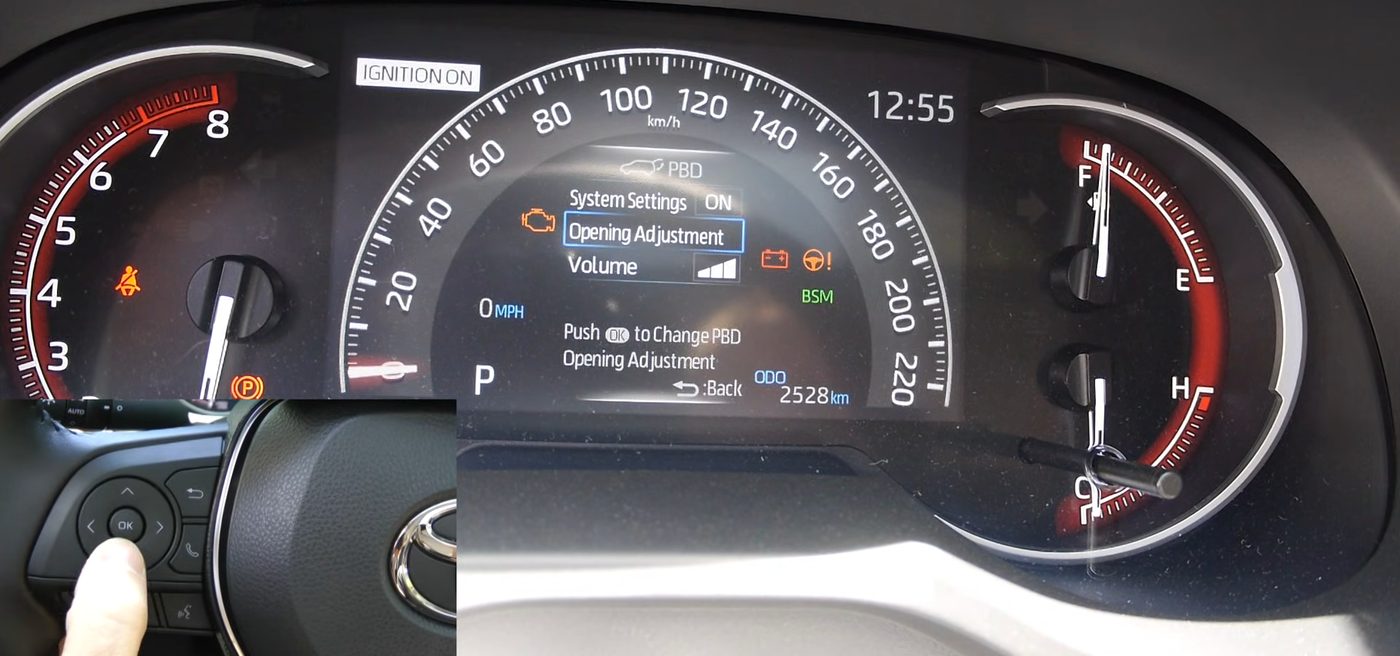
Here's the PBD menu on the 7-inch gauge screen of a 2019 RAV4. The System Settings line, which turns the power liftgate on or off, reads ON, and the inset shows the OK button on the steering wheel. On a RAV4 with the kick sensor, the PBD menu also has a Hands Free line. From Morozov Automotive's video.
- Turn the RAV4 on, shift into P and set the parking brake.
- Press the left or right arrow on the steering wheel pad until the gear icon is highlighted. The gear icon is the settings tab, and the icons run across the top of the gauge screen.
- Press the up or down arrow until you reach Vehicle Settings, which has a car-with-a-gear icon. Some owners had to scroll down to a second page to find Vehicle Settings. Vehicle Settings is in the same list where you reset the tire pressure warning and the maintenance reminder.
- Press and hold OK to open Vehicle Settings.
- Press the up or down arrow to reach PBD, then press and hold OK again.
- You'll now see the PBD items. The power back door on or off line is at the top, then Hands Free (or Kick Sensor on 2019 to 2021), then Opening Adjustment and Volume.
- Highlight Hands Free and press OK to switch the kick sensor on or off. Or highlight the first line and press OK to switch the whole power liftgate on or off.
- Press the back button to leave the menu.
And to turn the kick sensor or the power liftgate back on, you'd just follow the same steps and press OK on the same line again.
How to turn the kick sensor or power liftgate on or off: 2023 to 2025 with the 12.3-inch screen
- Turn the RAV4 on, shift into P and set the parking brake.
- Press and hold OK on the steering wheel pad until a cursor shows up on the gauge screen.
- Press the left or right arrow to move the cursor to the center part of the gauge screen.
- Highlight the gear icon, which is the settings icon, and press OK.
- Press the up or down arrow to reach Vehicle Settings, then press and hold OK to open Vehicle Settings.
- Press the up or down arrow to reach PBD, then press and hold OK.
- Highlight Hands Free and press OK to switch the kick sensor on or off. Or highlight the first line and press OK to switch the whole power liftgate on or off.
- Press the back button to leave the menu.
One 2023 Hybrid Limited owner couldn't find the PBD menu until he held down OK on Vehicle Settings. Then he turned on Hands Free, and the kick sensor worked on the first try.
How to turn the kick sensor or power liftgate on or off: 2026
So on a 2026 RAV4, Toyota's manual says you can change the PBD settings on either the gauge screen or the touch screen.
Using the 2026 gauge screen
- Turn the RAV4 on, shift into P and set the parking brake.
- With the cursor on the left part of the gauge screen, press the up or down arrow until you reach the gear icon, called Settings, and press OK.
- Go to Vehicle Settings and press and hold OK.
- Go to PBD and press and hold OK.
- The first line is the power liftgate on or off. The next line is Hands Free, and the third line is Opening Adjustment. Highlight the line you want and press OK.
- Press the back button when you're done.
Using the 2026 touch screen
- Tap Settings on the touch screen.
- Tap Vehicle, then Doors, Lights and Keys.
- You'll see Enable power back door, Enable hands free and Opening height. Tap the one you want to change.
Just keep in mind that the touch screen wording above comes from one dealer's walkthrough video of a 2026 XSE, because the manual shows icons rather than names. So the exact wording on your 2026 could be slightly different.
And something nice on a 2026 RAV4 is a reminder. If the power liftgate is off and you press the dash liftgate button, the gauge screen asks if you want the power liftgate back on. You'd just choose "Yes."
What happens after you change a PBD setting
- The PBD settings stay after you turn the RAV4 off. Toyota's manual says the power back door settings don't reset when you turn the car off. The PBD settings stay until you change them back.
- The PBD settings may not survive a battery disconnect or a service visit. One 2025 Prime owner set a lower height for his garage. After his 5,000-mile service, the liftgate opened to full height in the garage with about an inch to spare. So I'd recheck your PBD settings after any service or battery work.
- No dash light shows whether the power liftgate or Hands Free is on or off. You'd only know by checking the PBD menu. When the liftgate moves, you'll hear a buzzer and the hazard lights flash twice.
- After the 12-volt battery is disconnected and reconnected, Toyota's manual says to close the liftgate by hand once, so the power liftgate works properly again.
Every way to open and close the power liftgate
| Button | Where the button is | How to use the button |
|---|---|---|
| Key fob liftgate button | On your key fob | Press and hold to open or close. Press again while the liftgate is moving to stop the liftgate. Press and hold again to reverse the liftgate. |
| Dash button | Low on the dash, left of the steering wheel, at the right end of the row of small switches, with a picture of a car with its hatch open | Press and hold. Unlock the RAV4 first. With the RAV4 on, the dash button only opens the liftgate if you're in P, holding the brake, or have the parking brake set. A 2026 RAV4 also needs to be going under about 2 mph. |
| Outside button | The rubber button above the license plate, under the handle area | If the RAV4 is unlocked, press. If the RAV4 is locked, have the key on you and press and hold. The outside button only opens the liftgate. |
| Close button on the liftgate | The inside bottom edge of the open liftgate | Press to close. Press while the liftgate is moving to stop it, and press again to reverse it. You also use the close button to set the opening height. |
| 2026 close and "close and lock" buttons | The lower part of the liftgate | One button closes the liftgate. The other closes the liftgate and locks all the doors, once a dealer turns on close and lock. |
| By hand | The liftgate handle | Pull the liftgate part of the way down, and the closing assist finishes closing the liftgate. |
| Kick | Under the middle of the rear bumper | See the next section. |
Something to note about the outside button is that with the RAV4 locked, a quick press only unlocks the doors. Two 2019 XLE owners found it takes a firm 2 to 3 second press on the outside button to actually open the liftgate.
How to kick so the liftgate actually opens
So most kick problems come down to the kick itself. Basically, the kick sensor is looking for one quick, straight motion in and out, not a wave or a foot left under the bumper. These are the steps from Toyota's manual, plus what owners found works:
- Have the key on you. Stand behind the RAV4, about 12 to 20 inches from the bumper. Toyota's own video says the key needs to be within about 3 feet.
- Swing your foot straight in under the lower middle of the rear bumper, to within about 4 inches of the bumper. Kick straight toward the RAV4, not at an angle and not side to side. One owner said to pretend you're pressing an imaginary button under the bumper.
- Pull your foot right back. The whole in and out should take about 1 second. The liftgate won't start moving while your foot is still under the bumper.
- Don't touch the bumper with your foot.
- Step back and wait a second or two. There's a short pause before the beep. Toyota's video says you'll hear two beeps, one when the kick sensor feels your foot and one when the liftgate starts to move. And one owner who kept kicking again too soon found he just needed to wait.
- The liftgate opens all the way. To close the liftgate, kick the same way again. Kicking while the liftgate is moving stops the liftgate, and kicking again after that reverses it.
And on a 2026 RAV4, the manual adds that if the buzzer sounds twice, you'd just kick again. If another key is inside the RAV4 or the cargo area, the liftgate may also take a little longer to respond.
And keep in mind, the exhaust pipe can be hot, so keep your leg away from the exhaust pipe until the pipe cools down. The 2026 manual also says not to kick when the space under the bumper is tight, like next to a curb, because you could hurt your foot.
Why the kick sensor doesn't open the liftgate, and how to fix it
So "my kick doesn't work" is the most common power liftgate question from RAV4 owners. These are the causes owners actually turned out to have, roughly from most common to least common.
- The RAV4 doesn't have a kick sensor. This is the top cause by far. Owners of a 2020 XLE, a 2024 Hybrid XLE and a 2019 Adventure all kicked away before learning their RAV4 never had a kick sensor. A 2025 Limited owner thought his RAV4 had a kick sensor too. And one owner even chose a Limited for the kick sensor, then found his Limited didn't have the package that adds the kick sensor. So check the trim table and the PBD menu above first.
- Hands Free is switched off. Toyota ships Hands Free on, but a dealer or a previous owner may have switched Hands Free off. Turn Hands Free on in the PBD menu.
- The kick isn't right. Go back over the kick steps above. Basically, kick straight in, pull back quickly, then step back and wait.
- A trailer hitch is installed. Toyota says the kick sensor doesn't work with a towing hitch. I cover hitches in the next section.
- Dirt, snow, ice or water on the bumper. The manual says heavy rain or a car wash can stop the kick sensor from working. Clean off the lower middle of the bumper.
- Electrical noise nearby. Basically, strong signals from nearby equipment can confuse the kick sensor. The manual lists pay parking machines, gas stations, heated roads, fluorescent lights, TV or radio towers, airports and big electronic signs. Move the RAV4 and try again.
- Something was touching the bumper, like plants or tall grass, or you leaned on the bumper for a while. Move the RAV4 and wait a moment before kicking again.
- The RAV4 is turned on. The 2019 to 2025 manuals say the RAV4 must be off.
- The bumper was damaged or changed. Maybe the sensor area took a hard hit, or the bumper was painted, covered with a sticker or treated with a rain-repellent coating. If so, the manual says to have a dealer inspect the kick sensor.
- The key is too far away, or another key is inside the RAV4, which can slow the liftgate down.
Toyota's own fix is simple. Clean the dirt or snow off the lower middle of the bumper, move the RAV4, and try again. And if the kick sensor still doesn't work after that, take your RAV4 to the dealer.
Why the liftgate can open by itself
So with the key close by, the kick sensor can sometimes open the liftgate when you didn't mean to. The manual lists these things that can trigger the kick sensor by accident:
- A lot of water on the bumper, like when you're washing the RAV4 or in heavy rain.
- Wiping dirt off the bumper, or pulling something out from under the bumper.
- A small animal or a ball under the bumper.
- Someone sitting on the bumper and swinging their legs, or brushing past the bumper.
- Parking near plants, or setting luggage down near the bumper.
- Putting a car cover on or taking a car cover off, or being towed.
The fix for all of these accidental openings is to turn Hands Free off for a while. And one 2019 Hybrid Limited owner found his liftgate open in his locked garage. The cause turned out to be his wife's key fob getting pressed inside her purse in the house. So a key fob in a bag is worth ruling out too. The manual also says not to leave the key inside the cargo area.
Trailer hitches, bike racks and the kick sensor
So Toyota's position is clear. Toyota's manual says the hands-free power back door doesn't work when a towing hitch is installed. And the manual says to turn Hands Free off if there's an accessory on the rear bumper. Toyota's video says a hitch interferes with the kick sensor and recommends turning the kick sensor off. Owners also say the hitch instructions tell the installer to cut the bumper and remove the kick sensor.
But owners have found the hitch question isn't always that black and white. About 10 owners shared what happened after adding a hitch:
- Some kick sensors still work if you kick beside the hitch receiver. One owner kicks on the left, right under the safety chain loop, and pushes his foot a little further in.
- Some kick sensors work only some of the time after a hitch goes on.
- Some owners kept the kick sensor by rerouting the sensor wire. One 2020 Hybrid Limited owner rerouted one of the two 18-inch sensor cables around the hitch, and said the kick sensor works like a charm. And a Prime XSE owner cut out the middle of the sensor track and ran the wire around the receiver, and the liftgate opened and closed every time. The Prime XSE rerouting job is shown in James Klafehn's video on keeping the Prime kick sensor with a hitch.
- Some owners lost the kick sensor completely, like one owner whose dealer installed a hitch and threw the kick sensor parts away.
So if you're getting a hitch and want to keep the kick sensor, I'd ask the installer up front to reroute the sensor wire, not remove the kick sensor. And I haven't found any 2026 owner reports yet on a hitch plus the kick sensor.
Now bike racks are a separate issue. Toyota's manual warns that a bike rack or anything heavy mounted on the liftgate itself can make the liftgate suddenly shut again after opening. A liftgate that suddenly shuts could catch someone's head, hands or neck. So with a rack on the liftgate, Toyota says to turn Hands Free off, and Toyota recommends using genuine Toyota parts on the liftgate. With a hitch-mounted bike rack, one owner turned the whole power liftgate off so nobody would open the liftgate into his rack. Setting a lower opening height might also help keep the liftgate off a hitch rack. But that's just an idea, and I haven't seen an owner confirm a lower height helps.
How to set the power liftgate opening height
So if you have a low garage ceiling, you can make the liftgate stop lower. There are two ways, and whichever one you do last is the one the RAV4 uses.
Way 1: Set any height by hand
- Open the liftgate and stop the liftgate where you want it. You can press the key fob, dash or liftgate button again while the liftgate is rising, or move the liftgate by hand to that spot.
- Press and hold the close button on the inside bottom edge of the liftgate for about 2 seconds.
- The buzzer beeps 4 times. That means the height is saved, and the next time the liftgate opens, the liftgate stops at that spot. The PBD menu will now show "User setting."
Way 2: Pick a preset height in the PBD menu
Go into Vehicle Settings, then PBD, then Opening Adjustment, and pick 1 to 5. Number 5 is full height.
How to go back to full height
Press and hold the close button on the liftgate for about 7 seconds. On 2019 to 2025, you'll hear 4 beeps, then 2 more. On a 2026 RAV4, the manual says the buzzer sounds twice. Or you can just pick 5 in the PBD menu.
Roughly how high each preset is
One 2025 Prime XSE owner measured each Opening Adjustment setting with a tape measure. He says the numbers are rough, but they give you a good idea of what to pick for a low garage.
| Opening Adjustment | Bottom edge of the liftgate | Highest point of the liftgate |
|---|---|---|
| 1 | 36 inches | 66 inches |
| 2 | 46.5 inches | 68 inches |
| 3 | 58 inches | 72 inches |
| 4 | 70 inches | 79 inches |
| 5 (full height) | 81.5 inches | 85 inches |
When to turn the power liftgate off: car washes, tire changes, low garages and full loads
So to turn the whole power liftgate off, you'd go to Vehicle Settings, then PBD, and switch the first line off, using the steps for your gauge screen above. On a 2026 RAV4, you can also tap "Enable power back door" on the touch screen.
Toyota says to turn the power liftgate off at these times:
- Before an automatic car wash.
- Before jacking up the RAV4 or changing a tire, so a bumped button doesn't bring the liftgate down onto your hands.
And owners turn the power liftgate off at these times:
- With a full load. One 2022 Prime owner couldn't close the liftgate on a cargo area full of dorm clothes, because the liftgate kept sensing the load and reversing.
- With something sticking out the back, like lumber.
- With a hitch bike rack, so nobody opens the liftgate into the rack.
Now if you only want to stop the kick, and not the whole power liftgate, turn off Hands Free instead. Toyota says to turn off Hands Free when you have a hitch or bumper accessory, a heavy rack on the liftgate, or anywhere the liftgate could open by accident. And one Prime XSE owner turned off Hands Free after a kick opened the liftgate into a low garage pipe and chipped the paint.
Why the power liftgate stops halfway and beeps
So first, some beeping is normal. One beep and two flashes of the hazard lights when the liftgate starts moving just means the power liftgate is working. But if the liftgate stops partway and beeps, the power liftgate is telling you something stopped the liftgate.
What Toyota's manual says stops the power liftgate
- Something is in the way. The power liftgate stops and beeps if it senses something in the way. Basically, there are pinch sensors down the left and right edges of the liftgate. If a pinch sensor is damaged or unplugged, the liftgate won't close by power.
- The conditions changed while the liftgate was moving. With the RAV4 on, shifting out of P or letting go of the brake while the liftgate opens will stop the liftgate.
- The 12-volt battery voltage dropped suddenly. Starting the RAV4 while the liftgate is moving can cause that sudden voltage drop, so wait until the liftgate finishes before you start the car.
- The RAV4 is on a slope. Once stopped, the liftgate can open or close on its own on a slope. Push the liftgate fully open.
- Ice is stuck between the liftgate and the body, or someone forced the liftgate by hand while the motor ran. Both can damage the power liftgate, so clear any ice from the top gap before you open the liftgate in winter.
What owners found was causing the stop and beep
About 15 owners on RAV4 forums posted about a liftgate that stops and beeps. These are the causes they found, and how they fixed them.
- Worn power struts. The struts are the two arms that lift the liftgate. One 2020 Hybrid Limited owner's liftgate rose a few inches, double-beeped and was hard to lift by hand. Most strut reports are from 2013 to 2018 RAV4s, though, and one older-RAV4 owner paid about $950 to replace both struts.
- Bad pinch sensors. One owner's dealer found trouble codes B2226 and B2227 and replaced both side pinch sensors. The pinch sensors are the rubber strips down the inside edges of the liftgate opening. Another owner found car wash dryer air upset the pinch sensors, and wiping the pinch sensors with a wet rag fixed the problem.
- Bent hinges or a misaligned liftgate. In 2023, one owner got two beeps and a liftgate that wouldn't close, and the dealer said the liftgate was damaged. Another owner bent his liftgate by opening it with ice packed in the top gap. And one owner was quoted $3,395 by Toyota, plus body shop work to line the liftgate back up.
- A weak 12-volt battery, especially in cold weather. One owner fixed his liftgate by replacing a 5-year-old battery.
- A reset opening height. One owner fixed his liftgate by resetting the height, opening the liftgate fully and holding the close button until 4 beeps.
Now something to keep in mind is that a stop and beep problem can come and go, so a dealer may not see the problem. One owner's dealer tried 15 to 20 times and couldn't make the liftgate stop. So if your liftgate stops and beeps like this, I'd take a short video of the liftgate stopping on your phone to show the dealer.
And some owners of older RAV4s use a reset trick. They turn PBD off, turn the RAV4 off, open the liftgate fully by hand, and hold the close button through a series of beeps. Then they close the liftgate by hand, turn the car on, turn PBD back on, and restart the car. But keep in mind this reset came from 2018 and older RAV4s, and it isn't in the 2019 and newer manual. One owner also had to do the reset 4 times. The steps Toyota's 2019 and newer manual does give are closing the liftgate by hand after a battery reconnect, and the 7-second hold to clear the height.
Can you add a kick sensor to a RAV4 that didn't come with one?
So sometimes, yes, but it's not a sure thing. One 2021 Prime SE owner worked out how to add Toyota's own kick sensor, and posted a full parts list and wiring writeup on RAV4World. He says Toyota leaves the kick sensor programming in every RAV4, but RAV4s without a kick sensor don't have the wiring or the sensor.
The parts owners used
- A Toyota luggage room wire harness, part 82181-42250. Toyota's parts site lists the 82181-42250 harness at $81.49 (checked October 14, 2026, and Toyota says the dealer sets the actual price). Owners paid about $58 online and $61 at a dealer. Keep in mind this harness is for a RAV4 that has rear cross traffic alert but no rear parking sensors. Rear cross traffic alert warns you about cars passing behind you as you back up. The owner warns the harness is different if your RAV4 has parking sensors or no cross traffic alert.
- A Toyota kick sensor and bracket. Owners bought used sensor and bracket sets on eBay for $50 to $150. Here's an eBay search for a RAV4 kick sensor, which is a search, not one listing. New, Toyota's parts site lists kick sensor 891B2-0R031 at $324.34 (checked October 14, 2026). But kick sensor part numbers vary by year and by where the RAV4 was built, so have a dealer check the part number against your VIN.
- Two Toyota clips, part 90467-07215. Toyota's parts site lists the 90467-07215 clip at $2.31 each (checked October 14, 2026).
- Two 90980-12520 pigtail connectors, which are short plug-in jumper wires. The owner bought them on Amazon for $7.99 each. I couldn't find that exact listing, so here's an Amazon search for the 90980-12520 pigtail.
- Three #10 screws to hold the bracket.
What the job involves
- Take off the rear bumper. The owner says the rear bumper is easier with two people.
- Pull off the driver's side rear trim panel in the cargo area.
- Swap the old luggage room harness for the new 82181-42250 harness.
- Mount the bracket and the kick sensor under the bumper.
- Join the two pigtail connectors, which are not wired pin to pin. Going from the sensor side to the body side, pin 7 goes to 8, pin 6 to 5, pin 2 to 6 and pin 3 to 7.
Once the kick sensor is plugged in, the Hands Free line shows up in the PBD menu by itself. You don't need a dealer to turn the kick sensor on.
One success and one failure on a 2025
The success: A 2025 Hybrid XLE owner did the swap in November 2025 for about $200 and in under an hour. He paid $61 for the harness at his dealer, $145 for a used sensor and bracket on eBay, and $17 for the two jumpers. Instead of removing the whole bumper, he took off the driver's side wheel arch trim and the bumper clips and bolts, and let the bumper hang. He broke both clips on the wheel arch trim, and a new wheel arch trim piece is $76. His jumper leads were about an inch too short, so he suggests 14 to 16 inches. Once everything was connected, the kick sensor just started working.
The failure: Another 2025 Hybrid owner used the same parts, the same harness number and the same wiring in May 2026. Kicking did nothing, not even a beep. The Hands Free line showed up in the PBD menu with just the harness plugged in, even with the kick sensor unplugged, and switching Hands Free on didn't help. The owner who wrote the original writeup suggested Toyota may have stopped putting the kick sensor wiring in later RAV4s. He suggested using a meter, which is a simple electrical tester, to check that the four kick sensor wires actually run through on the body side. As of October 14, 2026, there's been no follow-up.
So ultimately, the Hands Free line showing up doesn't prove the wiring behind it is there. Two 2025 hybrids with the same parts got different results. So if you try the swap, I'd check those four wires with a meter before you buy the kick sensor.
Tips, warnings and what other sites get wrong
- The power liftgate switch isn't in the glove box anymore. The 2013 to 2018 RAV4 had a power liftgate on and off button in the glove box. The 2019 and newer RAV4 doesn't, and the switch is in the PBD menu on the gauge screen. A lot of older forum posts and videos mix up the old glove box button and the PBD menu.
- A dealer doesn't need to "activate" the kick sensor. If your RAV4 has the kick sensor, you turn it on yourself with Hands Free in the PBD menu. And if your RAV4 doesn't have the kick sensor hardware, no dealer setting can add the kick sensor.
- The kick sensor is in the middle of the bumper. Some people have been told the kick sensor is on the left side. Toyota's manual says the lower center of the bumper.
- Hands Free is on by default. Some owners read the manual as saying Hands Free ships off. Toyota's settings table says Hands Free ships on, so if Hands Free is off on your RAV4, someone switched it off.
- For 2019 to 2025, kick with the car off. Toyota's video says off or in P, but the 2019 to 2025 manuals say off.
- Turn the power liftgate off before an automatic car wash and before a tire change, since Toyota says to.
- Clean the lower bumper and move the RAV4 before calling the dealer about a kick sensor that stopped working.
- Don't lift the liftgate by hand while the motor is working.
Buddy's take
So ultimately, two things solve most power liftgate questions. The menu is called PBD, and you press and hold OK to get into Vehicle Settings and PBD.
And if your kick does nothing, I'd check whether your RAV4 actually has a kick sensor before anything else, because that's the most common answer. Then make sure Hands Free is on, and kick straight in, pull back quickly and step back.
For me personally, I'd also set a lower opening height if you have a low garage, and just recheck the opening height after every service.
Videos worth watching about the RAV4 power liftgate
And if you'd like to see the kick and the PBD settings in action, here are the clearest videos I found. You can play each video right here on the page, and under each video, I've put a quick summary of what the video covers.
Toyota's own short video on using the kick sensor on a 2023 RAV4.
- Before you kick: Toyota says to have the smart key on you and the RAV4 off or in P. Just keep in mind the 2019 to 2025 manuals say the car should be off.
- The kick: Toyota shows standing behind the center and kicking straight forward under the bumper in one quick motion, not at an angle, and not leaving your foot there.
- The two beeps: You hear one beep when the kick sensor feels your foot and one when the liftgate starts to open. Then you step away, and kick again to close.
- Hitches: Toyota says a tow hitch interferes with the kick sensor and recommends turning the kick sensor off.
A dealer salesman walks through every power liftgate control on a 2026 RAV4 XSE.
- The kick: He says to keep the key within about 3 feet, hold your foot in for about a second and pull back. The kick opens and closes the liftgate.
- The 2026 buttons: He shows the two buttons on the liftgate, one that closes and one that closes and locks all the doors, plus the dash button.
- Closing assist and jam protection: Pulling the handle down makes the liftgate finish closing on its own, and the liftgate stops if it hits something.
- The gauge screen menu: He goes to Settings, then Vehicle settings, and presses and holds OK to reach PBD. The PBD menu has power door on or off, hands-free on or off, and opening adjustment 1 to 5 or custom.
- The touch screen menu: Settings, then Vehicle, then Doors, Lights and Keys, with Enable power back door, Enable hands free and Opening height.
A short video that shows, more than tells, how to set the opening height by hand on a 2019 to 2025 RAV4.
- Setting the height: Stop the liftgate where you want it, then press and hold the liftgate close button for 2 seconds until you hear 4 beeps.
- Checking the height: The next time the liftgate opens, the liftgate stops at that spot.
- Going back to full height: Hold the close button for 7 seconds, through 4 beeps and then 2 more.
So hopefully this helps you get your RAV4's liftgate opening, closing and stopping exactly where you want it.
Have a question about “How to use your RAV4's power liftgate and hands-free kick sensor”?
Ask it here. Every question comes to me first. I'll answer as many as I can, and when I answer one, I'll add the question and my answer to this page so other RAV4 owners can see it too. I don't ask for your email, so check back on this page for the answer.
More owner guides
How to stop the RAV4 360 camera from popping up, and how to use its views
The RAV4's 360-degree camera can take over your map every time you slow down. Here's how to stop the 360 camera from popping up on the 2019 to 2025 and 2026 RAV4, and how to use each camera view when you actually want it.
How to take your RAV4 through an automatic car wash
A short checklist of what to turn off before a conveyor car wash, and where each button is. Plus how to keep a 2019 to 2025 or 2026 RAV4 in neutral from start to finish.
How to set up and use the RAV4 digital rearview mirror
What the lever and each button on the RAV4 digital rearview mirror do, and how to get a clear camera picture with bifocals or at night. I also show how to program the HomeLink garage door buttons on the same mirror.
How to get the big digital speedometer on your RAV4, and set up the gauge screen
The exact steps for the 4.2-inch, 7-inch, 12.3-inch and 2026 gauge screens, plus brightness that's too dim, turn arrows you don't want, tire pressures for each tire, and the blank screen recall.
Where the RAV4 heated steering wheel, wiper de-icer and heated seat buttons are, and how to use them
The heated steering wheel and wiper de-icer buttons on a RAV4 are easy to miss. Here's exactly where they are on every year from 2019 to 2026, what each light means, and which ones you have to press again every drive.
How to use the RAV4 memory seat, link it to your key, and fix a seat that beeps but won't move
The RAV4 memory seat saves two driver's seat positions to the 1 and 2 buttons on the driver's door. Here's how to save a position, tie it to your key fob and fix the most common memory seat problem. And here's how to stop the seat moving by itself, on 2019 to 2025 and on the 2026.
What "PKSB Unavailable" means on your RAV4, and how to fix it
What the PKSB Unavailable message and the flashing PKSB OFF light mean, how to clear the message yourself, the right reset after a 12-volt battery disconnect, and when it's time to see a Toyota dealer.
How to use the RAV4 rain-sensing wipers, and which way the sensitivity ring turns
The RAV4 rain-sensing wipers start on their own when rain hits the windshield. Here's every wiper stalk position and which way to turn the sensitivity ring. I also cover when to turn AUTO off, and how to fix wipers that are slow in mist or stop working after a new windshield.
The best places to learn about your RAV4 and find other RAV4 owners
When you own a RAV4, you start wondering where other owners hang out and where to get real answers. Here's the top pick for every topic, plus the other good options and the catch with each one.
The Toyota app on a RAV4: what's free, what costs money, and what to keep
When you link your RAV4 to the Toyota app, it walks you through a lot of trials and paid plans. Here's what each one does, what it costs when the trial ends, and what you already get free.
How to stop the Toyota welcome screen, and whether you need to link your RAV4
The Toyota welcome screen on your RAV4 keeps asking you to link the car to the Toyota app. Here's how to make it go away for good, and what you give up if you never link it.
How to turn off your RAV4's automatic parking brake (PKSB)
The switch that stops your RAV4 from slamming on the brakes while you park is not the same switch as the parking beeps. Here's exactly which switch does what, where to find the PKSB switch on your RAV4, and how to turn PKSB back on.
- Toyota's 2023 to 2025 RAV4 Hybrid owner's manual (OM0R102U): switch location p.19; meter control switches p.20 and p.106; 7-inch screen settings p.111 to 113; 12.3-inch screen settings p.121 to 125; power liftgate buttons p.145 to 146; kick p.147; operating conditions, jam protection and closing assist p.148; hands-free conditions p.149; accidental opening and battery reconnect p.150; warnings p.151 to 152; kick sensor precautions p.153 to 154; settings staying on and opening height p.154 to 155; car wash p.384; tire change p.473 and p.476; settings table and dealer settings p.524 to 525.
- Toyota's earlier RAV4 Hybrid owner's manual (OM0R025U), most likely the 2020 model year: PBD settings with "Kick Sensor" p.110 to 111; kick p.139 to 140; hitch note p.702. Its gas twin, OM0R024U, has the same liftgate text.
- Toyota's RAV4 Hybrid owner's manual (OM0R058U), most likely the 2022 model year: "Hands Free" wording p.108 to 109; hitch note p.694.
- Toyota's 2026 RAV4 owner's manual (OM0R032U): PBD settings p.103 to 104; turn-back-on prompt p.106 to 107; buttons p.130 to 132; close and lock p.132 to 133; kick and Walk-Away p.133 to 135; conditions p.136 to 139; warnings p.140 to 142; settings and opening height p.142 to 144; car wash p.482; settings p.614 to 615 and p.622 to 623.
- Toyota's RAV4 and RAV4 Prime SourceBooks for 2020 to 2025, the 2019 brochure, and Toyota's 2026 RAV4 specifications and October 22, 2025 press release, for which trims have each feature.
- RAV4World owner threads: adding the factory kick sensor, opening height measurements, 2020 liftgate stops and beeps twice, foot-activated liftgate, activating the foot control, kick tailgate, hatch opening in a locked garage, liftgate won't close, two beeps, liftgate opens a bit then stops, disabling the 2022 power rear door, deactivating the power liftgate, liftgate opens but won't close and adding a kick sensor.
- Toyota Nation owner threads: hands-free liftgate not working and liftgate opening by itself.
- Videos from Toyota USA, Steven Welch, Morozov Automotive and James Klafehn. Parts prices from Toyota's parts site, checked October 14, 2026.
RAV Buddy is an independent fan site. We're not affiliated with or endorsed by Toyota. RAV4 is a trademark of Toyota Motor Corporation.