
Quick picks
What PKSB, the automatic parking brake, actually does
So PKSB is the part of your RAV4 that brakes for you at parking speeds. Basically, if you're going about 9 mph or slower and you keep rolling toward a wall, a post or another object, PKSB first cuts the power. And if you still keep going, PKSB slams on the brakes. When you're backing up, PKSB also brakes for a car crossing behind you. On the 2026 RAV4, PKSB brakes for people walking behind you too.
PKSB uses the small round sensors in your front and rear bumpers to see walls and objects. And PKSB uses the radar in the rear corners of the RAV4 to see cars crossing behind you. Toyota's manual says PKSB reacts to objects about 6 to 13 feet away.
Now here's what you'll see on the screen behind the steering wheel when PKSB steps in, in this order:
- "Object Detected Acceleration Reduced" means PKSB cut the power. There's no beep for this message.
- "BRAKE!" with a short beep means PKSB is braking the RAV4. On a 2026, the beep is one long beep, and on a 2026 with the camera system, "BRAKE!" also shows on the center touchscreen.
- "Switch to Brake" or "Press Brake Pedal" shows once the RAV4 has stopped.
Something to note is that PKSB only holds the brakes for about 2 seconds after the RAV4 stops, and then PKSB lets go. So once PKSB stops you, you'd want to press the brake pedal yourself right away. And Toyota says never to test PKSB by driving at a wall.
What Toyota has called PKSB over the years
So Toyota has used a few names for the automatic parking brake, which makes it harder to tell if your RAV4 has PKSB.
- On a 2019 RAV4, the window sticker calls the feature "Intelligent Clearance Sonar with Rear Cross-Traffic Braking."
- From 2020 on, the window sticker and brochure call the feature "Front and Rear Parking Assist with Automatic Braking."
- In the owner's manual and on the RAV4's screens, the automatic braking is always called PKSB, or Parking Support Brake.
The easiest way to tell if your RAV4 has PKSB is to look in the settings menu. If your RAV4 shows a line called PKSB in the settings, your RAV4 has the automatic parking brake. And if there's no PKSB line at all, your RAV4 didn't come with PKSB. On 2019 to 2025 RAV4s, PKSB came in packages or on the upper trims, which I go through in my 2019 to 2025 Technology Package guide. On the 2026, PKSB is standard on every trim except the LE, which I cover in my 2026 RAV4 technology guide.
The four separate switches, and what each one turns off
So the switches are the part that trips up almost every new owner. Your RAV4 has four different parking and crash features, and each feature has its own on and off switch. Turning off one of the four switches doesn't turn off the other three.
| Switch name on the screen | What the feature does | What turning the switch off does |
|---|---|---|
| PKSB (Parking Support Brake) | PKSB cuts the power and then brakes the RAV4 at parking speeds, for walls and objects in front and behind, and for cars crossing behind you. | Turns off all of the automatic parking braking at once, both the braking for objects and the braking for crossing cars. The parking beeps keep working. |
| Intuitive Parking Assist (called Parking Assist-Sensor on the 2026) | Intuitive Parking Assist is the parking beeps. The sensors beep faster as you get close to something, and a small picture shows which corner of the RAV4 is close. The parking beeps never brake the RAV4. | Stops the beeping and the corner picture only. The automatic braking still works. |
| RCTA (Rear Cross Traffic Alert) | When you back out of a parking spot, RCTA beeps and flashes the lights in your side mirrors if a car is coming from the left or right. RCTA never brakes the RAV4 by itself. | Turning RCTA off stops the RCTA beeps and mirror lights only. |
| PCS (Pre-Collision System) | PCS is the forward crash braking at normal driving speeds. PCS uses the camera at the top of the windshield and the radar in the grille. | PCS is a completely different system from PKSB. I'm only listing PCS here so you don't turn off the wrong one. |
So basically, if you want the RAV4 to stop braking on its own while you park, the PKSB switch is the one that matters. And if you also want the beeping to stop, you'd turn off the Intuitive Parking Assist switch too.
Something to note about RCTA is that Toyota's manual doesn't say whether turning off RCTA changes the braking for crossing cars on 2019 to 2025 RAV4s. And owners don't agree on the answer. But the manual does say that turning off PKSB turns off all of the PKSB braking at once, including the braking for crossing cars. So if you want no automatic braking, PKSB is the switch to turn off.
When Toyota says to turn PKSB off
So Toyota's owner's manual has its own list of times to turn PKSB off, because something on or around the RAV4 could set off the braking by mistake. The list is the same in the 2019, 2022, 2023 to 2025 and 2026 manuals. So PKSB should be off any time one of these is true:
- A bicycle carrier, a towing eyelet, a bumper protector or a snow plow is near one of the bumper sensors. A towing eyelet is the screw-in tow hook.
- You're going through an automatic car wash.
- You're towing a trailer.
- The RAV4 is being loaded onto a truck or a boat, or tested on a roller machine, which Toyota calls a chassis dyno.
- The suspension has been modified, or the tires aren't the factory size.
- A heavy load raises or lowers the front of the RAV4.
- The RAV4 has been in an accident.
- You're doing sporty or off-road driving.
- The tire pressure is wrong, the tires are very worn, or you're using tire chains, the spare tire or the tire repair kit.
And keep in mind that Toyota's towing steps also say to turn PKSB off before the RAV4 is towed with the towing eyelet.
Now the reasons owners actually turn PKSB off are mostly bike racks, hitch-mounted spare tires, cargo carriers and small trailers. About 8 owners across RAV4World threads describe hard braking in reverse with one of those on the back. One owner's RAV4 even braked hard while backing out of a spot at the post office. If you go through car washes, I cover every step in my RAV4 car wash checklist.
How to tell which steps to follow for your RAV4
So the PKSB switch is in a different place depending on your RAV4's year and its gauge screen. Basically, the gauge screen is the screen behind the steering wheel, which Toyota calls the multi-information display.
- A 2019 to 2022 RAV4 has either a small 4.2-inch screen or a 7-inch screen between two round gauges. The PKSB steps are the same for both screen sizes.
- A 2023 to 2025 RAV4 with a 7-inch gauge screen has real needles on the gauges on each side of the screen. If your speedometer has a physical needle, you have the 7-inch screen.
- A 2023 to 2025 RAV4 with the 12.3-inch gauge screen has one big digital screen that fills the whole gauge area, with no physical needles. Toyota put the 12.3-inch screen on the Limited, and on the Hybrid XSE with the Technology Package.
- A 2026 RAV4 uses the center touchscreen for the PKSB switch, not the gauge screen.
The steering wheel buttons you'll use on 2019 to 2025
So on 2019 to 2025 RAV4s, you move around the gauge screen with the buttons on the left spoke of the steering wheel.
- The arrow pad is a round pad with up, down, left and right arrows.
- The OK button is in the middle of the arrow pad.
- The back button has a curved arrow on it and sits just to the right of the arrow pad. On most RAV4s, a phone button sits below the back button.
Toyota says to stop the RAV4 before you use the steering wheel buttons to change settings. So I'd park, shift into P, which is Park, and leave the RAV4 turned on before you start.
How to turn off PKSB: 2019 to 2022, and 2023 to 2025 with the 7-inch gauge screen
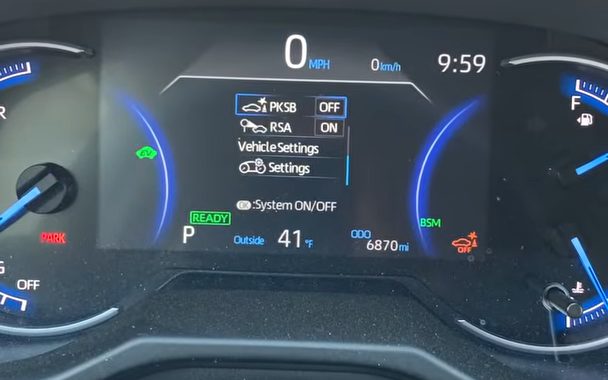
Here's the PKSB line in the gauge screen settings on a 2020 RAV4 Hybrid, switched to OFF, with the orange PKSB OFF light now showing at the lower right, from Hoosier in the woods' video.
The steps below work on gas and hybrid RAV4s from 2019 to 2022 with either the 4.2-inch or the 7-inch gauge screen. And the same steps work on 2023 to 2025 RAV4s with the 7-inch gauge screen.
- Turn the RAV4 on, so the engine is running or the gauge screen shows READY on a hybrid. Stop and shift into P.
- Press the left or right arrow on the steering wheel pad until the gear icon is highlighted. The gear icon is the settings tab, in the row of icons on the gauge screen. You'll see a list of settings.
- Press the down arrow to move through the list until you reach PKSB. On a 2023 to 2025, the line reads PKSB (Parking Support Brake System). The PKSB line shows "On."
- Press OK once. The PKSB line changes to "Off," a message confirms the change, and the PKSB OFF light comes on in the gauge screen.
- Press the back button to leave the settings.
And to turn PKSB back on, you'd follow the same steps and press OK on the PKSB line again. The PKSB line then reads "On," and the PKSB OFF light goes out.
Now the parking beeps switch is in the same list. The parking beeps line is called Intuitive Parking Assist, and RCTA has its own line a few rows away. Owners describe the little icons next to each line in different ways, so I'd go by the letters PKSB on the line rather than the icon.
How to turn off PKSB: 2023 to 2025 with the 12.3-inch gauge screen
So the 12.3-inch gauge screen is split into three areas: left, center and right. That's why the 12.3-inch screen needs one extra step to get a cursor first.
- Turn the RAV4 on, stop and shift into P.
- Press and hold OK on the steering wheel pad until a cursor, which is a highlight box, shows up on the gauge screen.
- With the cursor on the center area of the gauge screen, press the up or down arrow until the gear icon is highlighted. Then press OK.
- Press the up or down arrow to move the cursor to PKSB (Parking Support Brake System).
- Press OK to switch PKSB off. The PKSB OFF light comes on in the gauge screen.
- Press the back button to finish.
And to turn PKSB back on, you'd follow the same steps and press OK on the PKSB line again.
Something to note is that the parking beeps line is in the same list. In the Toyota dealer's video further down this page, he scrolls down past the parking beeps line to reach PKSB. And he points out that the parking beeps line "just beeps." So make sure the cursor is on PKSB before you press OK.
RAV4 Prime, 2021 to 2025
So the RAV4 Prime is the plug-in hybrid RAV4. I haven't been able to confirm the Prime's PKSB steps from a Prime owner's manual, because Toyota's site doesn't have one for the 2021 to 2025 Prime. But Prime owners on RAV4World describe the same gauge screen settings as the regular RAV4. So on a Prime, I'd follow the 7-inch or 12.3-inch steps above, whichever matches the gauge screen in your Prime.
How to turn off PKSB on a 2026 RAV4
So on the 2026 RAV4, Toyota moved the PKSB switch to the center touchscreen. The 2026 manual's settings table shows PKSB can only be changed on the touchscreen, not on the gauge screen. The same goes for the parking beeps switch, which the 2026 calls Parking Assist-Sensor, and the RCTA switch.
These are the steps Toyota's 2026 manuals give:
- Stop, set the parking brake and shift into P. Leave the hybrid system on. Toyota says to change these settings in P with the hybrid system running.
- On the center touchscreen, tap the gear icon, which is Settings, on the main menu.
- Tap Driving Assist in the side menu. The 2026 multimedia manual says the Driving Assist menu holds the Parking Assist-Sensor settings and the other driving support settings.
- Find PKSB (Parking Support Brake) and tap PKSB to switch PKSB off.
- The PKSB OFF light comes on in the gauge screen, and a message shows.
And to turn PKSB back on, you'd go back to the same PKSB line and tap PKSB on again.
Now if you just bought a 2026 and the RAV4 doesn't seem to brake when you creep toward your garage wall, check the PKSB switch on the touchscreen first. One owner who traded a 2022 for a 2026 XLE Premium noticed his 2026 didn't seem to brake. Other owners told him to make sure PKSB was on, and that he wasn't mixing up PKSB with the parking beeps.
Times the 2026 turns PKSB off by itself
So the 2026 RAV4 turns PKSB off on its own for a while in a few situations. The 2026 manual lists these four situations:
- Folding the outside mirrors turns off PKSB, and turns off RCTA too.
- Opening the back door, which is Toyota's word for the liftgate, turns off PKSB.
- Opening a side door turns off PKSB.
- Hooking up a trailer turns off PKSB, RCTA and the rear parking sensors once the 2026 confirms a trailer is connected.
What happens after you turn PKSB off
So the four switches don't all behave the same way when you restart the RAV4. The table below shows what stays off and what turns itself back on.
| What was turned off | 2019 to 2025 | 2026 |
|---|---|---|
| PKSB, turned off by you in settings | Stays off after you turn the RAV4 off and on. The PKSB OFF light stays on as a reminder. | Stays off until you turn PKSB on again in the touchscreen settings. |
| PKSB, shut off by itself after braking for you | Comes back on by itself when you shift between D and R, or when the object is no longer in your path. A restart also turns PKSB back on. | Same as 2019 to 2025, and PKSB also comes back on when you shift into P. |
| Parking beeps (Intuitive Parking Assist, or Parking Assist-Sensor on the 2026) | Stays off after a restart. | Stays off after a restart. On a 2026 with the detection indicator, the parking beeps turn back on by themselves when you shift into R. |
| RCTA | Turns itself back on every time you restart the RAV4. | Not confirmed whether RCTA stays off after a restart. |
| PCS (forward crash braking) | Only stays off for that drive. | Not confirmed. |
So basically, PKSB and the parking beeps stay off until you turn them back on, but RCTA comes back on its own on 2019 to 2025. Now a common trap is forgetting to turn PKSB back on. Owners who turn PKSB off for a bike rack tend to forget PKSB is still off. The PKSB OFF light on the gauge screen is your reminder. So if you see the PKSB OFF light and nothing is on the back anymore, turn PKSB back on.
And if the PKSB OFF light is flashing, or the gauge screen says "PKSB Unavailable," that's a different problem from turning PKSB off. I cover what the flashing light means and how to fix it in my PKSB Unavailable guide.
How to quiet the parking beeps for now, without turning anything off
So if you just want the beeping to stop for a moment, like in a car wash or a tight garage, you don't have to turn anything off. You can mute the parking beeps instead.
- On 2019 to 2025, when the parking beeps start, the gauge screen offers a mute option. Press OK on the steering wheel to mute the parking beeps for now. The mute cancels when you change gear, go above a set speed, or restart the RAV4. So in a car wash, you'd shift into N, or Neutral, first and then mute.
- On the 2026, a mute button shows up on the center touchscreen when the sensors detect something. The 2026 mute button quiets the parking sensor, RCTA and rear camera detection beeps together. The 2026 mute cancels when you change gear.
But keep in mind that muting only stops the noise. Muting the parking beeps does not turn off the automatic braking.
Common PKSB problems owners run into
- "I turned off the beeps and the RAV4 still slammed on the brakes." This is the most common mix-up by far. The beeps switch and the PKSB switch are separate, so you'd turn off PKSB to stop the braking.
- "My RAV4 says Parking Brake Unavailable." That message is about the electric parking brake, the one you set with the switch near the shifter. The electric parking brake is not PKSB, even though the names look alike. Owners say "Parking Brake Unavailable" usually comes from a weak 12-volt battery or bad wiring, like a dash cam spliced into the car's wiring.
- "My RAV4 brakes hard in reverse with my bike rack on." A bike rack, hitch-mounted spare tire, cargo carrier or small trailer can sit close enough to the rear sensors to set off PKSB. Toyota's manual says to turn PKSB off when a bicycle carrier or towing eyelet is near a sensor.
- "I can't find the PKSB switch." On 2019 to 2025, the PKSB switch is on the gauge screen behind the steering wheel, not the center touchscreen. On the 2026, the PKSB switch is on the center touchscreen, not the gauge screen.
- "My RAV4 braked for nothing." Toyota says PKSB can brake for things that aren't a real threat. Toyota's list includes railroad crossing arms, tall grass, banners, low branches, gates, narrow tunnels, steep slopes, metal grates and a moving automatic car wash. When PKSB brakes for something like that, press the brake or wait about 2 seconds, and then you can drive.
Tips and things other sites get wrong
- The parking beeps can sound without PKSB braking. The area where the sensors beep and the area where PKSB brakes are different sizes. So hearing the beeps doesn't mean PKSB is about to brake.
- PKSB may not brake for objects when the shift lever is in N. Toyota's manual says the object braking may not work in N. But I'd still turn PKSB off before a car wash, as Toyota's own list says to.
- PKSB doesn't come in the same package every year. Some sites say only the Limited has PKSB, or that PKSB comes in one particular package. Which RAV4s have PKSB changes by year and package, so the PKSB line in your settings menu is the real answer.
- On 2019 to 2025, the PKSB switch is on the gauge screen. A lot of how-to pages skip this, so owners waste time looking through the center touchscreen.
- Turn PKSB back on when you're done. Once the bike rack, trailer or car wash is behind you, turning PKSB back on gets you the parking protection again.
Videos that show the PKSB switch
And if you'd like to see the PKSB switch on a real screen, here are the clearest videos I found. You can play each video right here on the page, and YouTube's usual controls work, including skipping ahead, changing the speed and going full screen. Under each video, I've put a quick summary so you can decide whether the video is worth your time.
A 2020 RAV4 Hybrid owner shows where the PKSB switch is on his gauge screen, and why he turns PKSB off.
- Why he turns PKSB off: He explains that PKSB brakes for his teardrop trailer or a hitch bike rack behind the RAV4.
- Where the PKSB switch is: He says he looked on the center touchscreen first, and the PKSB switch was actually on the gauge screen behind the steering wheel.
- The steps: He presses the right arrow through the icons to the gear icon, the down arrow to PKSB, and OK to turn PKSB off.
- Turning PKSB back on: He turns PKSB back on after towing, so he keeps the parking protection.
A Toyota dealer walks through the PKSB switch on a current Toyota with an all-digital gauge screen, which works the same way as the 12.3-inch steps above.
- When to turn PKSB off: He names car washes where the turning tires might set off the braking, and bike racks or trailers.
- The steps: He uses the arrows to bring the settings to the middle of the screen, presses OK, and scrolls down to PKSB.
- Beeps versus braking: He shows that the parking beeps line only beeps, and the PKSB line is the braking.
- After PKSB is off: He points out that a PKSB OFF light stays on the gauge screen and a pop-up reminder shows up often.
The same dealer goes through each parking switch one at a time. Keep in mind his demo car isn't a RAV4, but the menus are the same Toyota menus.
- The parking beeps switch: He shows that the parking beeps line is separate from PKSB, and that pressing and holding OK on the parking beeps line opens the volume.
- Why he keeps the beeps off: He keeps the parking beeps off because of his garage, and says that way the car wash doesn't "yell at" him.
- What PKSB does: He says PKSB slams on the brakes if you're about to hit something, and that PKSB can also brake in tall grass off-road.
- Car washes: His own RAV4 doesn't brake in the car wash. But he says if your RAV4 does, turn PKSB off, and then turn PKSB back on afterward.
- The other switches: He shows RCTA and the rear camera detection as their own separate lines.
Buddy's take
So ultimately, if your RAV4 keeps braking with a bike rack, trailer or hitch spare on the back, turn off the PKSB switch, not the parking beeps. On 2019 to 2025, the PKSB switch is on the gauge screen behind the steering wheel. On the 2026, the PKSB switch is on the center touchscreen.
And for me personally, I'd turn PKSB back on as soon as the bike rack or trailer comes off. Several owners say PKSB has stopped them from hitting a pole or a person. The PKSB OFF light will remind you until you turn PKSB back on.
So hopefully this saves you from a few surprise stops.
Have a question about “How to turn off your RAV4's automatic parking brake (PKSB)”?
Ask it here. Every question comes to me first. I'll answer as many as I can, and when I answer one, I'll add the question and my answer to this page so other RAV4 owners can see it too. I don't ask for your email, so check back on this page for the answer.
More owner guides
How to stop the RAV4 360 camera from popping up, and how to use its views
The RAV4's 360-degree camera can take over your map every time you slow down. Here's how to stop the 360 camera from popping up on the 2019 to 2025 and 2026 RAV4, and how to use each camera view when you actually want it.
How to take your RAV4 through an automatic car wash
A short checklist of what to turn off before a conveyor car wash, and where each button is. Plus how to keep a 2019 to 2025 or 2026 RAV4 in neutral from start to finish.
How to set up and use the RAV4 digital rearview mirror
What the lever and each button on the RAV4 digital rearview mirror do, and how to get a clear camera picture with bifocals or at night. I also show how to program the HomeLink garage door buttons on the same mirror.
How to get the big digital speedometer on your RAV4, and set up the gauge screen
The exact steps for the 4.2-inch, 7-inch, 12.3-inch and 2026 gauge screens, plus brightness that's too dim, turn arrows you don't want, tire pressures for each tire, and the blank screen recall.
Where the RAV4 heated steering wheel, wiper de-icer and heated seat buttons are, and how to use them
The heated steering wheel and wiper de-icer buttons on a RAV4 are easy to miss. Here's exactly where they are on every year from 2019 to 2026, what each light means, and which ones you have to press again every drive.
How to use the RAV4 memory seat, link it to your key, and fix a seat that beeps but won't move
The RAV4 memory seat saves two driver's seat positions to the 1 and 2 buttons on the driver's door. Here's how to save a position, tie it to your key fob and fix the most common memory seat problem. And here's how to stop the seat moving by itself, on 2019 to 2025 and on the 2026.
What "PKSB Unavailable" means on your RAV4, and how to fix it
What the PKSB Unavailable message and the flashing PKSB OFF light mean, how to clear the message yourself, the right reset after a 12-volt battery disconnect, and when it's time to see a Toyota dealer.
How to use your RAV4's power liftgate and hands-free kick sensor
Which RAV4s have a power liftgate and a kick sensor, and how to turn each one on or off on every gauge screen. Plus how to kick so the hatch actually opens, and what to do when the liftgate stops halfway and beeps.
How to use the RAV4 rain-sensing wipers, and which way the sensitivity ring turns
The RAV4 rain-sensing wipers start on their own when rain hits the windshield. Here's every wiper stalk position and which way to turn the sensitivity ring. I also cover when to turn AUTO off, and how to fix wipers that are slow in mist or stop working after a new windshield.
The best places to learn about your RAV4 and find other RAV4 owners
When you own a RAV4, you start wondering where other owners hang out and where to get real answers. Here's the top pick for every topic, plus the other good options and the catch with each one.
The Toyota app on a RAV4: what's free, what costs money, and what to keep
When you link your RAV4 to the Toyota app, it walks you through a lot of trials and paid plans. Here's what each one does, what it costs when the trial ends, and what you already get free.
How to stop the Toyota welcome screen, and whether you need to link your RAV4
The Toyota welcome screen on your RAV4 keeps asking you to link the car to the Toyota app. Here's how to make it go away for good, and what you give up if you never link it.
- Toyota's 2023 to 2025 RAV4 Hybrid owner's manual (OM0R102U): indicators P.88 and 90, steering wheel switches P.106 and P.116, 7-inch settings P.110 to 113, 12.3-inch settings P.121 to 123, Intuitive Parking Assist P.300 and mute P.306, RCTA restart P.308, PKSB P.312 to 322, turning PKSB off before towing P.453.
- Toyota's 2023 RAV4 owner's manual (OM0R100U): the same PKSB settings menu on the gas RAV4.
- Toyota's 2022 RAV4 Hybrid owner's manual (OM0R058U): settings P.107 to 108, PKSB P.295 to 299.
- Toyota's 2019 to 2020 RAV4 owner's manual (OM0R024U): settings P.94, PKSB P.277 to 281, and the list of things that can set off the parking sensors when there's no real danger.
- Toyota's 2026 RAV4 Hybrid owner's manual (OM0R032U): indicators P.88, mirror folding and doors turning PKSB off P.261, trailer P.341, Parking Assist-Sensor P.351, RCTA P.360, mute P.363, PKSB P.370 to 374, how to customize P.614 to 615, settings table P.627 to 628.
- Toyota's 2026 RAV4 multimedia owner's manual (OM0R164U): P.47, the Settings menu and Driving Assist.
- Owner experiences from RAV4World threads, including automatic braking with a hitch-mounted spare, turning off rear auto braking, Parking Brake Unavailable and 2026 driver assist functions, read October 2026.
- Videos from Hoosier in the woods (April 2021) and Steve Clifford (March 2024 and October 2025), linked above.
RAV Buddy is an independent fan site. We're not affiliated with or endorsed by Toyota. RAV4 is a trademark of Toyota Motor Corporation.