
Quick picks
What the RAV4 memory seat is, and what it saves
So the memory seat, which Toyota calls "driving position memory," lets the power driver's seat remember two positions. Each position is saved to a button marked 1 or 2 on the driver's door. And when you press 1 or 2, the driver's seat drives itself back to that saved spot.
Basically, the memory seat saves four things about the driver's seat. Those four things are how far forward or back the seat is, the seatback angle, the seat height, and the tilt of the front of the seat cushion. On a 2026 RAV4 with a head-up display, the memory seat saves the head-up display height too. A head-up display, or HUD, is the speed and other info projected onto the windshield in front of you.
Now something to note is what the memory seat doesn't save. On every RAV4 from 2019 to 2026, the memory seat doesn't save the lumbar support, the side mirrors or the steering wheel. The steering wheel on every RAV4 is adjusted by hand, so there's no motor for the memory seat to control. So if you share the car, you'll still set the mirrors and the steering wheel yourself.
The memory seat buttons, and what each one does
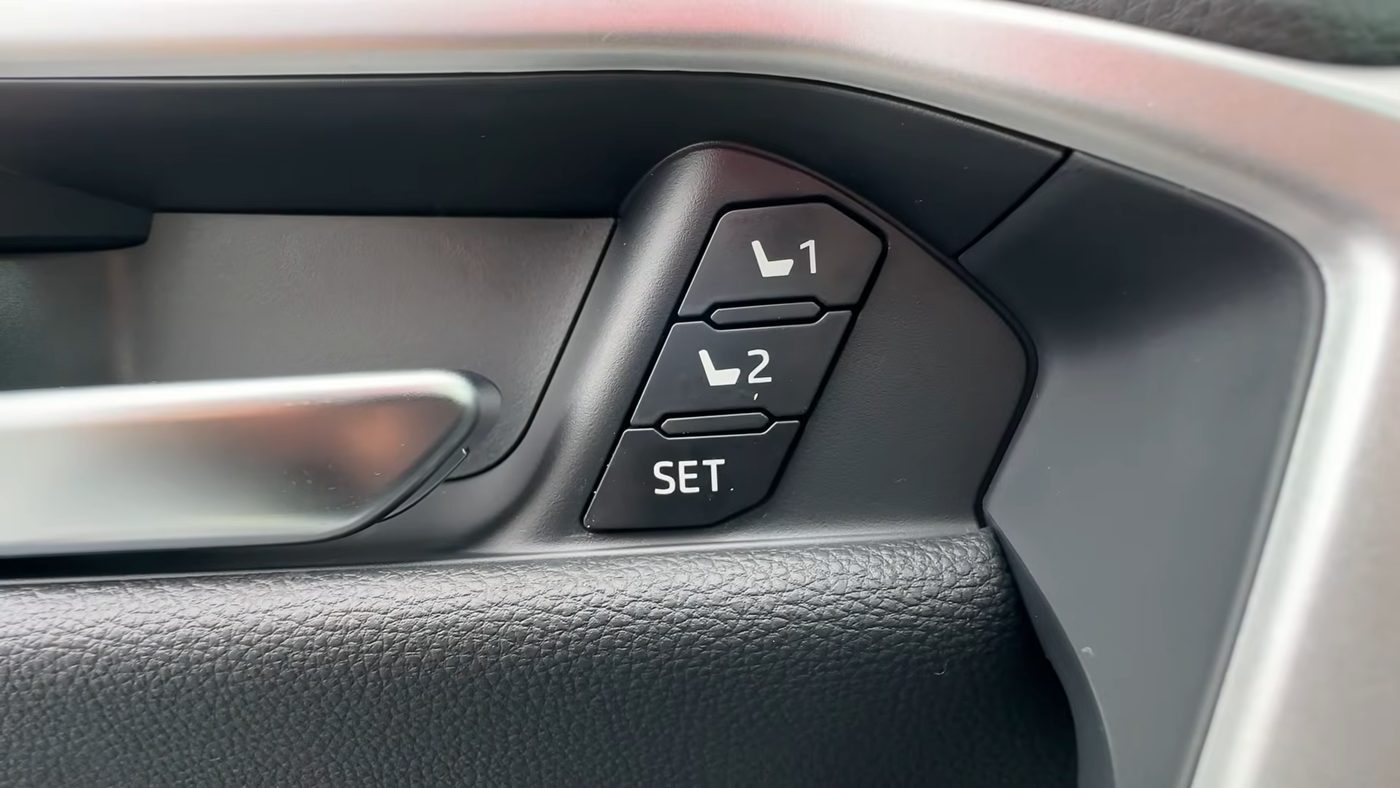
Here are the memory seat buttons on the driver's door of a 2023 to 2025 RAV4, with 1 on top, 2 in the middle and SET at the bottom, right next to the inside door handle, from Brian Ruperti's video.
So on a 2019 to 2025 RAV4, there are no memory seat settings on the touchscreen or on the gauge screen behind the steering wheel. Everything is done with buttons, and the RAV4 answers with beeps. These are the buttons involved:
- The 1, 2 and SET buttons are on the driver's door panel, above the inside door handle. If a RAV4 doesn't have these three buttons on the driver's door, that RAV4 doesn't have a memory seat.
- The door lock switch is the lock and unlock switch on the driver's door armrest, next to the window switches. This door lock switch is the one you use to link a key fob, not the lock button on the fob itself.
- The seat switches are on the outer side of the driver's seat cushion. The front switch moves the seat forward and back, up and down, and tilts the front of the cushion. The rear switch changes the seatback angle. The small round switch is the lumbar support, which the memory seat doesn't save.
And this is what each combination of those buttons does on a 2019 to 2025 RAV4:
| What you press | What it does |
|---|---|
| Hold SET, then press 1 or 2 | Saves where the driver's seat is right now to button 1 or button 2. |
| Press 1 or 2 by itself | Moves the driver's seat to the spot saved on that button. Moving to a saved spot only works in Park. |
| Hold 1 or 2, then hold the door lock switch | Links the key fob you're carrying to the spot saved on that button. |
| Hold SET, then hold the door lock switch | Unlinks the key fob you're carrying from the memory seat. |
Now there are two more memory seat settings, but only a dealer can change them. The first dealer setting stops the headrest from hitting the ceiling while the seat moves to a saved spot, and that headrest setting is on from the factory. The second dealer setting is listed only in the earlier 2019 to 2022 manuals. That door setting lets a dealer make the seat move when any door is unlocked, not just the driver's door. I haven't been able to confirm whether a dealer can still change that door setting on a 2023 to 2025 RAV4.
Which RAV4s have the memory seat
So the memory seat isn't on every RAV4. On some trims the memory seat is standard, and on others the memory seat only comes inside a package. The table below shows which RAV4 trims have the memory driver's seat, by year.
| Years | Standard on | Only with a package |
|---|---|---|
| 2019 and 2020 | Limited and Limited Hybrid | XLE Premium with the Weather Package |
| 2021 | Limited and Limited Hybrid | XLE Premium and XLE Premium Hybrid with the Weather Package. Prime XSE with the Premium Package. |
| 2022 | Limited and Limited Hybrid | XLE Premium (gas or hybrid) with the Weather Package. Hybrid XSE with the Technology Package. Prime XSE with the Premium Package. |
| 2023 to 2025 | Limited and Limited Hybrid | XLE Premium (gas or hybrid) with the Weather Package. Hybrid XSE with the Advanced Technology Package. Prime XSE, called the plug-in hybrid XSE for 2025, with the Premium Package. |
| 2026 | Hybrid XSE, Hybrid Limited and Plug-in Hybrid XSE | No package adds the memory seat on a 2026 |
And the memory seat was never offered on the LE, XLE, Adventure, TRD Off-Road, Hybrid SE, Hybrid Woodland or Prime SE. A 2019 to 2021 Hybrid XSE can't have the memory seat at all. On the 2026, the LE, SE, XLE Premium, Woodland and GR SPORT don't have the memory seat either.
Now something to keep in mind is that on an XLE Premium, the memory seat comes in the Weather Package, not the Technology Package. I explain everything in each package in my Weather Package guide and my Technology Package guide. And if you're looking at a used RAV4, just check the driver's door for the 1, 2 and SET buttons.
How to tell which RAV4 memory seat steps you need
So there are really only two sets of memory seat steps on this page. If your RAV4 is a 2019 to 2025, the steps are the same for gas, hybrid and Prime, and for both the 7-inch and the 12.3-inch gauge screen. If your RAV4 is a 2026, the 2026 is the new generation, and the memory seat works with driver profiles on the touchscreen.
How to save a seat position on a 2019 to 2025 RAV4
- Put the RAV4 in Park. The memory seat won't save or move the seat in any other gear.
- Turn the power to ON. You can start the RAV4 normally with your foot on the brake. Or, without your foot on the brake, press the power button twice, so the dashboard lights up without the engine starting.
- Set the driver's seat where you want it with the seat switches on the side of the seat.
- Hold the SET button on the driver's door, then press 1 (or 2) until you hear a beep. The beep means the position is saved to that button.
- Test the saved position. Move the seat a little with the seat switches, then press 1. The seat should beep and drive back to your spot.
Now in the 2023 to 2025 manuals, Toyota says you can also tap SET and then press 1 or 2 within 3 seconds. But the earliest 2019 to 2022 manuals only describe holding SET. So holding SET while you press 1 or 2 works on every year.
And keep in mind that saving to button 1 or 2 replaces whatever was saved there before, and the RAV4 doesn't warn you. To change a saved spot, you just save a new spot over the old one the same way.
How to move the seat to a saved position
- Put the RAV4 in Park with the power ON.
- Press 1 or 2 on the driver's door until the RAV4 beeps. The driver's seat moves to the spot saved on that button.
- To stop the seat partway, press SET, press 1 or 2, or touch any seat switch.
So something to note is that the 1 and 2 buttons still work for a short time after you turn the RAV4 off. The 1 and 2 buttons work for up to 180 seconds after the driver's door is opened. And the 1 and 2 buttons work for up to 60 seconds after the driver's door is closed again. So you can press 1 as you climb in, before you start the car.
And if pressing 1 does nothing while you're driving or stopped at a light, that's normal. The memory seat only moves the seat when the RAV4 is in Park.
How to link your key fob to the memory seat on a 2019 to 2025 RAV4
So linking a key fob means the driver's seat moves to your saved spot when you unlock the driver's door with your fob. Basically, the RAV4 senses which fob is unlocking the car and moves the seat to that fob's saved spot. Linking a fob is handy when two people share the RAV4 and each has their own fob.
- Save your position to 1 or 2 first, using the steps above. A fob can't link to a button that has nothing saved on it.
- Take only the fob you want to link into the RAV4. Leave the other fob in the house, not just in a pocket or bag nearby. With two fobs in the car, the link won't work properly.
- Close the driver's door, put the RAV4 in Park and turn the power ON.
- Press 1 (or 2) so the seat moves to the position you want linked.
- Keep holding that same 1 or 2 button, then press and hold the door lock switch on the driver's armrest until you hear a beep. Either side of the door lock switch works, lock or unlock.
- Listen to the beep. One beep means the fob is linked. If the RAV4 beeps nonstop for about 3 seconds instead, the link didn't take, so try again from step 4.
- For a second driver, bring only the second fob into the car and repeat the same steps with button 2.
Now after that, this is how the linked fob works. Lock the RAV4 and walk away. When you come back with that fob, unlock the driver's door by touching the door handle or by pressing unlock on the fob. Then open the driver's door. The driver's seat moves to your saved spot. And if the seat is already in your spot, nothing moves.
How to unlink a key fob from the memory seat on a 2019 to 2025 RAV4
So unlinking is the only way to stop a key fob from moving the seat on a 2019 to 2025 RAV4. There's no menu setting for the key fob link.
- Take only the fob you want to unlink into the RAV4, and close the driver's door.
- Put the RAV4 in Park and turn the power ON.
- Hold SET on the driver's door, then press and hold the door lock switch on the armrest, either side, until the RAV4 beeps twice.
- Two beeps means the fob is unlinked. A nonstop beep for about 3 seconds means the unlink didn't work, so try again.
And unlinking the fob doesn't erase your saved spots. Buttons 1 and 2 still work when you press them. To turn the key fob link back on later, just do the link steps again.
How to fix a memory seat that beeps but won't move
So a seat that beeps but won't move is by far the most common RAV4 memory seat problem. You hold SET and press 1, the RAV4 beeps like the position saved, but pressing 1 later does nothing. Or the memory seat never worked from the day you bought the RAV4.
Basically, the seat's computer has to learn where the seat's end points are, meaning how far the seat can travel each way. Toyota calls this learning step "initializing" the seat, and the dealer is supposed to initialize the seat before delivery. But that setup step sometimes gets skipped. Toyota even sent dealers tech tips about this problem for the 2019 to 2022 RAV4, RAV4 Hybrid and RAV4 Prime.
Now the sign that your seat needs this fix is that the driver's seat beeps while you move it with the regular seat switches. And the good news is that you don't need the dealer for this fix in most cases. The fix is running the seat to all its limits, and I'll call that the end-point reset on this page.
Before you start
- Fold the rear seats upright and make sure they're locked, so the driver's seat has room to go all the way back.
- Put the RAV4 in Park with the power ON.
- Stand outside with the driver's door open if you can. That way you're not squeezed when the seat goes all the way forward and up.
The quick fix most owners say worked
- Move the driver's seat all the way forward.
- Move the seat all the way up.
- Recline the seatback all the way back.
- Hold SET and press 1 until the RAV4 beeps.
- Now set the seat where you actually want it, then hold SET and press 1 again.
- Test the memory seat. Move the seat a little, then press 1. The seat should drive back to your spot.
If the quick fix doesn't work, run the seat to every limit
- Run the seat all the way up, then all the way down.
- Run the seat all the way forward, then all the way back.
- Recline the seatback all the way, then bring the seatback fully upright.
- Keep going until the beeping stops when you move the seat. No beep while moving means the seat has learned its end points.
- Save your position again with SET and 1, and test the saved position.
And if neither fix works, the dealer has a longer initialization procedure in Toyota's repair manual. So I'd ask the service desk for a "memory seat initialization," and mention Toyota Tech Tip T-TT-0668-21 for a 2020 to 2022 RAV4, or T-TT-0535-19 for a 2019. Something to note is that some dealers have been stumped by this problem. And a few dealers even replaced parts before finding out the seat just needed to be initialized.
How to stop the seat moving on its own on a 2019 to 2025 RAV4
So when a RAV4 driver's seat moves by itself, the cause is almost always a linked key fob. The RAV4 moves the seat to the spot linked to whichever fob it detects. And if both linked fobs are near the car, the RAV4 can pick the other driver's fob and move the seat to their spot. That can happen even when you open the driver's door to get out.
Now if the seat starts moving and you don't want it to, touch any seat switch or press SET. The seat stops right away.
And these are the fixes that work, from simplest to most permanent:
- Carry only your own fob. If the other driver's fob stays in the house, the RAV4 can only detect yours.
- Put the spare fob to sleep with battery-saving mode. I explain the steps just below this list.
- Unlink both fobs with the unlink steps above, and just press 1 or 2 when you get in. That way the seat only moves when someone presses a button.
How to put a RAV4 key fob in battery-saving mode
- On the key fob, hold the lock button and press the unlock button twice.
- The light on the fob flashes 4 times. That means the fob is now in battery-saving mode.
- To wake the fob up, press any button on the fob.
Basically, a fob in battery-saving mode stops talking to the RAV4 until you press a button. So the sleeping fob can't move the seat. But keep in mind that the driver carrying the sleeping fob can't unlock the doors by touching the door handle. And the RAV4 won't start just because that fob is inside. Once you press any button on the sleeping fob, the fob works normally again.
How to save a seat position on a 2026 RAV4
So the 2026 RAV4 still has the 1, 2 and SET buttons on the driver's door. And those buttons work almost the same way as on a 2019 to 2025. The main difference is that the 2026 also saves the head-up display height if your RAV4 has one.
- Put the RAV4 in Park and turn the power ON.
- Set the driver's seat where you want it. If you have a head-up display, set its height with the meter control switches on the steering wheel.
- Hold SET, then press 1 or 2 until the RAV4 beeps. You can also tap SET and press 1 or 2 within 3 seconds.
- To use the saved spot, put the RAV4 in Park with the power ON and press 1 or 2.
And to stop the seat partway, touch any seat switch. If you adjust the head-up display while the seat is moving, only the head-up display stops.
How the 2026 RAV4 seat follows each driver's profile
So driver profiles are the real change on the 2026. The 2026 RAV4 stores driver profiles in a feature Toyota calls My Settings. My Settings holds up to 3 drivers plus 1 guest, and each driver's profile carries that driver's seat position.
Basically, on a 2026 you don't press SET for the profile to save your seat. When you shift into Park after driving, the 2026 RAV4 saves wherever the seat is to your profile. So your profile always has the spot you last drove with.
Now this is what you'll see when you come back to the car. Carry only your own key, then unlock and open the driver's door with the key. The seat moves to a spot slightly behind your saved spot, so you have more room to get in. Then when you turn the power to ACC or ON, the seat finishes moving to your exact spot. ACC is the accessory mode, where the radio works but the dashboard isn't fully on. The head-up display only moves to your height once the power is ON.
And if you unlock a door other than the driver's door with your key, the seat doesn't move. In that case, just press 1 or 2.
How to set up a driver profile on a 2026 RAV4
So a 2026 driver profile needs a Toyota account in the Toyota app, on the App Store or Google Play.
- On the touchscreen, tap the gear icon, then tap Profile, and choose to create a profile.
- Scan the QR code on the touchscreen with the Toyota app on your phone.
- Set a 6-digit PIN for your profile.
How to link your key to your profile on a 2026 RAV4
- Take only the key you're registering into the RAV4. With two keys inside, the registration fails.
- On the touchscreen, tap the gear icon, then Profile, then Profile recognition.
- Tap Key (recommended) and follow the steps on the screen.
Now Profile recognition also has other ways to tell drivers apart. You can use a phone set up as a digital key, face recognition with the driver camera if your RAV4 has one, or a Bluetooth phone. But Toyota recommends registering the physical key even if you mostly use your phone as a key, because the RAV4 detects the physical key first.
How to stop the seat moving on its own on a 2026 RAV4
So on a 2026, there are two reasons the driver's seat moves without you pressing anything. Either a registered key is moving the seat to that driver's profile spot, or the seat is sliding back when you turn the car off.
Stop the key from moving the seat
To stop a key from moving the seat on a 2026, remove the key registration in Profile, then Profile recognition. Or switch to the Guest profile. I haven't been able to confirm whether a 2026 can keep your profile but stop only the seat from moving. Neither the 2026 owner's manual nor the 2026 multimedia manual says so. And keep in mind that removing one key registration removes all of them.
Turn off the seat slide when you get out
Now the 2026 RAV4 has a feature Toyota calls the power easy access system. Basically, the power easy access system slides the driver's seat back when you shift into Park and turn the RAV4 off, so getting out is easier. Then the seat slides forward again when you turn the power to ACC or ON, or buckle your seat belt.
- The seat doesn't slide back if the seat is already all the way back.
- Touching a seat switch while the seat is sliding stops the seat.
- If you move the seat during or after the slide back, the seat won't slide forward again when you get in.
The exit slide setting is called "Driver's seat slide movement when exiting the vehicle," and you can pick Full, Partial or Off. Off turns the slide off. To turn the slide back on, set the exit slide setting to Full or Partial again. Each driver's profile keeps its own choice. The setting is in the vehicle settings on the touchscreen, but I haven't been able to confirm the exact menu path on a 2026 RAV4 yet.
And on a 2019 to 2025 RAV4, there's no seat slide when you get out. But owners have a good workaround. Save button 2 as a getting-out spot, with the seat low and back, and press 2 before you climb out. Then link your fob to button 1, so the seat returns to your driving spot when you come back.
What happens after you save a position
- Your saved spots stay saved every time you turn the RAV4 off and on. There's nothing to redo each drive.
- There's no light or message for the memory seat on any RAV4 from 2019 to 2025. The memory seat only talks to you with beeps. One beep means saved, recalled or linked. Two beeps means a fob was unlinked. A nonstop beep for about 3 seconds means the step didn't work.
- Disconnecting the 12-volt battery erases the saved spots. Toyota also says the saved spots can be lost if power to the seat is cut while the seat is moving to a saved spot.
- A spot saved at the very end of the seat's travel may come back slightly off if you pushed the seat further after saving. And Toyota says a few positions saved in a certain range may not come back at all, and to see a dealer if that happens.
Common RAV4 memory seat problems and fixes
- SET and 1 beep, but the seat won't move. The seat was most likely never initialized. Use the end-point reset above.
- Pressing 1 or 2 does nothing while driving. That's normal. The memory seat only works in Park.
- The seat moves to the other driver's spot. Both linked fobs were near the RAV4. Keep the spare fob away, put the spare fob in battery-saving mode, or unlink the fobs.
- The key fob link won't work. Usually the second fob was nearby, or nothing was saved to the button first. Or the fob's lock button was pressed instead of the door lock switch on the armrest. Go back through the link steps with only one fob in the car.
- The saved spots disappeared. Saved spots usually disappear after the 12-volt battery was disconnected. Run the seat to its limits and save your spots again.
- The touchscreen driver profile doesn't move the seat on a 2023 to 2025 RAV4. That's how the 2023 to 2025 RAV4 works. Toyota's manual says the 2023 to 2025 touchscreen profile saves multimedia settings like volume, audio, navigation and phone, and the manual doesn't mention the seat. On a 2023 to 2025 RAV4, the seat only links to a fob through the door buttons. The 2026 is the first RAV4 where the touchscreen profile carries the seat.
- The mirrors and steering wheel don't move with the seat. That's normal on every RAV4 from 2019 to 2026. The memory seat only moves the driver's seat.
Tips and things other guides get wrong about the RAV4 memory seat
- The lock button for linking is on the door. Some videos say to hold "the lock button" without saying which one. On a RAV4, the lock button for linking is the door lock switch on the driver's armrest, not the fob.
- One beep means linked, two beeps means unlinked. Some videos say to hold until two beeps when linking. In Toyota's RAV4 manual, two beeps is the unlink signal.
- You can link a fob to the memory seat on a US RAV4. Some forum answers say the current RAV4 can't link the seat to a fob. That's wrong for US RAV4s, though RAV4s sold in some other countries may not offer the fob link.
- The real tech tip numbers are T-TT-0535-19 for the 2019 RAV4, and T-TT-0668-21 for the 2020 to 2022 RAV4, RAV4 Hybrid and RAV4 Prime. Some videos quote numbers that don't match.
- Try the end-point reset before booking a dealer visit. The end-point reset takes a couple of minutes, and it's what fixes most RAV4 memory seats that never worked.
- Check the headrest when the seat is set high. Toyota warns that the headrest should clear the ceiling when the seat moves to a saved spot.
Videos worth watching about the RAV4 memory seat
And if you want to see the memory seat in action, here are the clearest videos I found. You can play each video right here on the page. And under each video, I've put a quick summary of what the video covers, so you can decide whether it's worth your time.
A Toyota dealer's video shows the memory seat on an actual 2019 RAV4, so you can easily see where every button is.
- Where the buttons are: The video shows the 1 and 2 buttons on the driver's door panel, and the seat switches on the side of the seat.
- Saving a position: The presenter holds SET, presses 1 and waits for the beep.
- Using a saved position: The presenter presses 2, and the seat, the seatback and the seat height all move to the saved spot.
A quick walkthrough of linking a saved seat position to a key fob, on a Toyota whose model isn't named in the video.
- Saving first: He starts the car with the fob he wants to link, sets the seat, and saves the seat to 1, or 2 for a second driver.
- Linking the fob: He holds "the lock button" and the memory button together. Keep in mind that on a RAV4, the lock button is the door lock switch on the armrest, and one beep means linked. Two beeps is the unlink signal in Toyota's RAV4 manual.
- Testing the link: He moves the seat, locks the car, unlocks the car with the fob, and the seat returns to his spot.
- Two fobs: He says to decide which fob goes with which button. And I'd add, keep the other fob out of the car while you link each one.
The clearest video I found of the end-point reset, on a Toyota with the same 1, 2 and SET door buttons as the RAV4. The model isn't named in the video.
- Why the memory seat fails: He says the seat is supposed to be set up at delivery, but sometimes that setup gets missed. And he says you don't need the dealer to fix it.
- The warning sign: He shows the seat beeping while it moves, and pressing 1 doing nothing.
- The fix: He runs the seat all the way up and down, all the way forward and back, and reclines the seatback fully and then fully upright. The beeping stops.
- The test: He saves with SET and 1, moves the seat, presses 1, and the seat returns to his spot.
Buddy's take
So ultimately, on any RAV4 with the memory seat, I'd save your spot with SET and 1 and you're set. And if the seat beeps but never moves, I'd run the seat to its limits before calling the dealer, because running the seat to its limits fixes most memory seats that never worked.
For me personally, I'd only link a fob if two people share the RAV4. And if the seat starts jumping to the wrong spot, I'd keep the spare fob in the house or just unlink the fobs and press 1 or 2.
And on a 2026, if the seat sliding back every time you turn the car off bugs you, set the exit slide to Partial or Off.
So hopefully this helps you get the memory seat working the way you want.
Have a question about “How to use the RAV4 memory seat, link it to your key, and fix a seat that beeps but won't move”?
Ask it here. Every question comes to me first. I'll answer as many as I can, and when I answer one, I'll add the question and my answer to this page so other RAV4 owners can see it too. I don't ask for your email, so check back on this page for the answer.
More owner guides
How to stop the RAV4 360 camera from popping up, and how to use its views
The RAV4's 360-degree camera can take over your map every time you slow down. Here's how to stop the 360 camera from popping up on the 2019 to 2025 and 2026 RAV4, and how to use each camera view when you actually want it.
How to take your RAV4 through an automatic car wash
A short checklist of what to turn off before a conveyor car wash, and where each button is. Plus how to keep a 2019 to 2025 or 2026 RAV4 in neutral from start to finish.
How to set up and use the RAV4 digital rearview mirror
What the lever and each button on the RAV4 digital rearview mirror do, and how to get a clear camera picture with bifocals or at night. I also show how to program the HomeLink garage door buttons on the same mirror.
How to get the big digital speedometer on your RAV4, and set up the gauge screen
The exact steps for the 4.2-inch, 7-inch, 12.3-inch and 2026 gauge screens, plus brightness that's too dim, turn arrows you don't want, tire pressures for each tire, and the blank screen recall.
Where the RAV4 heated steering wheel, wiper de-icer and heated seat buttons are, and how to use them
The heated steering wheel and wiper de-icer buttons on a RAV4 are easy to miss. Here's exactly where they are on every year from 2019 to 2026, what each light means, and which ones you have to press again every drive.
What "PKSB Unavailable" means on your RAV4, and how to fix it
What the PKSB Unavailable message and the flashing PKSB OFF light mean, how to clear the message yourself, the right reset after a 12-volt battery disconnect, and when it's time to see a Toyota dealer.
How to use your RAV4's power liftgate and hands-free kick sensor
Which RAV4s have a power liftgate and a kick sensor, and how to turn each one on or off on every gauge screen. Plus how to kick so the hatch actually opens, and what to do when the liftgate stops halfway and beeps.
How to use the RAV4 rain-sensing wipers, and which way the sensitivity ring turns
The RAV4 rain-sensing wipers start on their own when rain hits the windshield. Here's every wiper stalk position and which way to turn the sensitivity ring. I also cover when to turn AUTO off, and how to fix wipers that are slow in mist or stop working after a new windshield.
The best places to learn about your RAV4 and find other RAV4 owners
When you own a RAV4, you start wondering where other owners hang out and where to get real answers. Here's the top pick for every topic, plus the other good options and the catch with each one.
The Toyota app on a RAV4: what's free, what costs money, and what to keep
When you link your RAV4 to the Toyota app, it walks you through a lot of trials and paid plans. Here's what each one does, what it costs when the trial ends, and what you already get free.
How to stop the Toyota welcome screen, and whether you need to link your RAV4
The Toyota welcome screen on your RAV4 keeps asking you to link the car to the Toyota app. Here's how to make it go away for good, and what you give up if you never link it.
How to turn off your RAV4's automatic parking brake (PKSB)
The switch that stops your RAV4 from slamming on the brakes while you park is not the same switch as the parking beeps. Here's exactly which switch does what, where to find the PKSB switch on your RAV4, and how to turn PKSB back on.
- Toyota's 2023 to 2025 RAV4 Hybrid owner's manual (OM0R102U): driving position memory p.163 to 166, switch locations p.19, door lock switches p.139, key battery-saving mode p.157, door lock customization p.523 to 524, memory customization p.525.
- Toyota's 2023 to 2025 RAV4 owner's manual (OM0R100U): driving position memory p.147, door lock switches p.123, battery-saving mode p.141, memory customization p.515.
- Toyota's 2019 to 2022 RAV4 Hybrid owner's manuals: OM0R025U (driving position memory p.157 to 160, battery-saving mode p.149, memory customization and the dealer door setting p.702) and OM0R058U (driving position memory p.151).
- Toyota's 2019 to 2022 RAV4 owner's manual (OM0R024U): driving position memory p.137, battery-saving mode p.129, memory customization p.693.
- Toyota's 2026 RAV4 owner's manual (OM0R032U): power easy access system p.179 to 180, memory buttons p.180 to 181, memory recall p.181 to 182, My Settings p.182 to 184, battery-saving mode p.146, easy access customization p.623.
- Toyota's 2026 RAV4 multimedia owner's manual (OM0R164U): user profiles p.39 to 46, profile settings p.49 to 50, Profile recognition p.53 to 54.
- Toyota's 2025 RAV4 multimedia owner's manual (OM0R195U): linking a user profile p.42 to 43.
- Toyota Tech Tips on NHTSA: T-TT-0535-19, Memory Seat Initialization, 2019 RAV4 and RAV4 Hybrid (April 4, 2019), T-TT-0668-21, 2020 to 2021 RAV4, RAV4 Hybrid and RAV4 Prime (October 5, 2021) and T-TT-0668-21 Rev1, 2020 to 2022 RAV4, RAV4 Hybrid and RAV4 Prime (July 21, 2022).
- Toyota's RAV4 sourcebooks for 2020, 2021, 2022, 2023, 2024 and 2025, the RAV4 Prime sourcebooks for 2021 and 2025, and Toyota's 2019 RAV4 brochure, for which trims have the two-position memory driver's seat.
- Toyota's 2026 RAV4 features page, 2026 RAV4 Plug-in Hybrid features page and 2026 RAV4 press release (October 22, 2025).
- RAV4World owner threads: Driver's seat memory not working (2019 to 2024, the quick fix on page 3 and an owner's copy of the dealer procedure on page 7), Memory seats, Memory Seats move unexpectedly, Driver's Memory Seat has Mind Of Its Own, Driver seat position memory issue for RAV4 Prime XSE, Is there a trick to using seat memory recall?, Memory Seat Issues?, Link fob to profile, What's the point of driver profiles? and Memory seats plus memory mirrors?
- Other owner forums: Toyota Nation, Seat memory not working, Toyota Nation, Memory seats controlling mirror position and Toyota Owners Club UK, Memory seats programmed to key fob.
RAV Buddy is an independent fan site. We're not affiliated with or endorsed by Toyota. RAV4 is a trademark of Toyota Motor Corporation.